

 Set up docs MCP
前置条件
要运行本文中的示例,你需要:
- 有一个正在运行的 ClickHouse server 实例
- 已安装
curl。在 Ubuntu 或 Debian 上,运行sudo apt install curl,或参阅此文档了解安装说明。
概述
HTTP 接口 允许你以 REST API 的形式,在任何平台上通过任何编程语言使用 ClickHouse。HTTP 接口 的功能比 native interface 更受限,但语言支持更好。
默认情况下,clickhouse-server 监听以下端口:
- 8123 端口用于 HTTP
- 可启用 8443 端口用于 HTTPS
如果发起不带任何参数的 GET / 请求,则会返回 200 响应码以及字符串 "Ok.":
$ curl 'http://localhost:8123/'
Ok.
"Ok." 是 http_server_default_response 中定义的默认值,可按需更改。
另请参见:HTTP 响应代码注意事项。
Web 用户界面
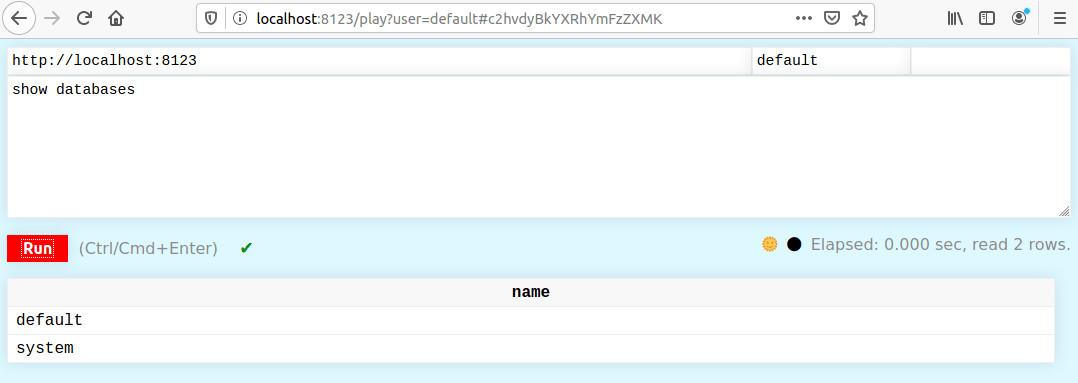
ClickHouse 提供了一个 Web 用户界面,可通过以下地址访问:
http://localhost:8123/playweb UI 支持在查询运行期间显示进度、取消查询以及流式传输结果。 它还提供了一项用于显示查询管道图表和图形的隐藏功能。
查询成功执行后,会出现一个下载按钮,允许您以多种格式下载查询结果,包括 CSV、TSV、JSON、JSONLines、Parquet、Markdown,以及 ClickHouse 支持的任何自定义格式。下载功能使用查询缓存高效获取结果,而无需重新执行查询。即使 UI 只显示了多页结果中的一页,它也会下载完整结果集。
web UI 专为像您这样的专业用户而设计。
在健康检查脚本中,请使用 GET /ping 请求。此处理程序始终返回 "Ok." (末尾带有一个换行符) 。自 18.12.13 版本起可用。另请参阅 /replicas_status 以检查副本延迟。
$ curl 'http://localhost:8123/ping'
Ok.
$ curl 'http://localhost:8123/replicas_status'
Ok.
通过 HTTP/HTTPS 查询
通过 HTTP/HTTPS 查询有三种方式:
- 将请求作为 URL 的 'query' 参数发送
- 使用 POST 方法。
- 在 'query' 参数中发送查询的开头部分,其余部分通过 POST 发送
如果成功,你会收到 200 响应码,结果位于响应体中。 如果发生错误,你会收到 500 响应码,响应体中会包含错误描述文本。
使用 GET 的请求是 'readonly'。这意味着,对于会修改数据的查询,只能使用 POST 方法。 你可以将查询语句放在 POST 请求体中发送,也可以通过 URL 参数发送。下面来看一些示例。
在下面的示例中,使用 curl 发送查询 SELECT 1。请注意,空格需要进行 URL 编码:%20。
curl 'http://localhost:8123/?query=SELECT%201'1在此示例中,使用 wget 的 -nv (非冗长) 和 -O- 参数将结果输出到终端。
在这种情况下,无需对空格进行 URL 编码:
wget -nv -O- 'http://localhost:8123/?query=SELECT 1'1在此示例中,我们通过管道将原始 HTTP 请求发送到 netcat:
echo -ne 'GET /?query=SELECT%201 HTTP/1.0\r\n\r\n' | nc localhost 8123HTTP/1.0 200 OK
X-ClickHouse-Summary: {"read_rows":"1","read_bytes":"1","written_rows":"0","written_bytes":"0","total_rows_to_read":"1","result_rows":"0","result_bytes":"0","elapsed_ns":"4505959","memory_usage":"1111711"}
Date: Tue, 11 Nov 2025 18:16:01 GMT
Connection: Close
Content-Type: text/tab-separated-values; charset=UTF-8
Access-Control-Expose-Headers: X-ClickHouse-Query-Id,X-ClickHouse-Summary,X-ClickHouse-Server-Display-Name,X-ClickHouse-Format,X-ClickHouse-Timezone,X-ClickHouse-Exception-Code,X-ClickHouse-Exception-Tag
X-ClickHouse-Server-Display-Name: MacBook-Pro.local
X-ClickHouse-Query-Id: ec0d8ec6-efc4-4e1d-a14f-b748e01f5294
X-ClickHouse-Format: TabSeparated
X-ClickHouse-Timezone: Europe/London
X-ClickHouse-Exception-Tag: dngjzjnxkvlwkeua
1如你所见,curl 命令用起来有些不方便,因为空格必须进行 URL 转义。
虽然 wget 会自行转义所有内容,但我们不建议使用它,因为在使用 keep-alive 和 Transfer-Encoding: chunked 时,它通过 HTTP 1.1 的表现并不好。
$ echo 'SELECT 1' | curl 'http://localhost:8123/' --data-binary @-
1

$ echo 'SELECT 1' | curl 'http://localhost:8123/?query=' --data-binary @-
1

$ echo '1' | curl 'http://localhost:8123/?query=SELECT' --data-binary @-
1
如果查询的一部分通过参数传递,另一部分通过 POST 传递,那么这两个数据部分之间会插入一个换行符。 例如,下面这样是行不通的:
$ echo 'ECT 1' | curl 'http://localhost:8123/?query=SEL' --data-binary @-
Code: 59, e.displayText() = DB::Exception: Syntax error: failed at position 0: SEL
ECT 1
, expected One of: SHOW TABLES, SHOW DATABASES, SELECT, INSERT, CREATE, ATTACH, RENAME, DROP, DETACH, USE, SET, OPTIMIZE., e.what() = DB::Exception
默认情况下,数据会以 TabSeparated 格式返回。
可在查询中使用 FORMAT 子句来指定其他任意格式。例如:
wget -nv -O- 'http://localhost:8123/?query=SELECT 1, 2, 3 FORMAT JSON'{
"meta":
[
{
"name": "1",
"type": "UInt8"
},
{
"name": "2",
"type": "UInt8"
},
{
"name": "3",
"type": "UInt8"
}
],
"data":
[
{
"1": 1,
"2": 2,
"3": 3
}
],
"rows": 1,
"statistics":
{
"elapsed": 0.000515,
"rows_read": 1,
"bytes_read": 1
}
}您可以使用 default_format URL 参数,将默认格式指定为 TabSeparated 以外的格式。X-ClickHouse-Format 请求头可显式指定响应格式:它是 output_format 设置的别名,因此也会覆盖查询中的 FORMAT 子句。它绝不会改变 INSERT 请求正文的解析方式——请使用 input_format 或 format 指定输入格式。
$ echo 'SELECT 1 FORMAT Pretty' | curl 'http://localhost:8123/?' --data-binary @-
┏━━━┓
┃ 1 ┃
┡━━━┩
│ 1 │
└───┘
您可以使用 POST 方法执行参数化查询。参数通过花括号指定,并包含参数名称和类型,例如 {name:Type}。参数值通过 param_name 传入:
$ curl -X POST -F 'query=select {p1:UInt8} + {p2:UInt8}' -F "param_p1=3" -F "param_p2=4" 'http://localhost:8123/'

7
通过 URL 路径访问表并构造查询
适用于 ClickHouse 26.8 及更高版本。
HTTP 接口可将 URL 路径解析为数据库、表、输出格式和压缩方法。随后可通过 URL 参数控制结果,因此简单的读取请求无需使用 SQL。这些功能默认处于禁用状态,必须显式启用。
启用路径路由
路径解析由两个层级的设置控制:
- 启用服务器级配置项
http_allow_path_requests,允许 HTTP 接口将路径形式的请求路由至查询处理程序:
<clickhouse>
    <http_allow_path_requests>1</http_allow_path_requests>
</clickhouse>- 启用所需的用户级设置:
| 设置 | 效果 |
|---|---|
http_allow_table_as_file |
将最后一个路径组件解析为 table、table.format 或 table.format.compression。 |
http_allow_database_as_path |
将开头的 /database/ 路径组件解析为当前数据库。 |
http_allow_filters_as_path |
将 Hive 风格的 /name=value/ 路径组件解析为 WHERE 过滤器。 |
http_allow_filters_as_unrecognized_url_parameters |
将无法识别的 URL 参数解析为 WHERE 过滤器。 |
将表作为文件访问
启用 http_allow_table_as_file 后,对 /table.format.compression 的请求会被处理为 SELECT * FROM table。启用 http_allow_database_as_path 后,可使用 /database/table.format.compression。
# SELECT * FROM my_db.hits, formatted as CSV
curl 'http://localhost:8123/my_db/hits.csv'

# The same result, compressed with gzip
curl 'http://localhost:8123/my_db/hits.csv.gz' | gzip -d
格式和压缩扩展名不区分大小写,因此 hits.csv 和 hits.CSV 等效。
显式指定的 format 或 output_format URL 参数会覆盖路径中的格式。default_format 则不会:它仅在没有其他方式指定格式时提供所用格式,而路径扩展名的优先级更高。显式指定的 compression 参数必须与路径中的压缩方式一致;值冲突会导致异常。
构造查询
以下设置会将基础查询包装为派生表。它们既可相互组合,也可与现有查询结合使用。您可以通过 HTTP URL 参数、查询中的 SETTINGS 子句或用户 profile 提供这些设置。
| 设置 | 作用 |
|---|---|
select |
SELECT <expression_list> FROM (…) |
filter |
添加 WHERE <expression>。多个 filter URL 参数会通过 AND 组合。 |
order |
添加 ORDER BY <expression_list>。 |
sort |
根据以逗号分隔的标识符或列位置列表添加 ORDER BY;每一项可选带有 + (升序) 或 - (降序) 前缀,例如 sort=a,-b。不能与 order 组合使用。 |
limit 和 offset |
添加 LIMIT <n> OFFSET <m>。两者都接受用于选择末尾数据的负值,以及表示行数占比的小数值。 |
page |
设置 offset = limit * (page - 1)。需要指定 limit,且不能与 offset 组合使用。 |
# Filter my_db.hits, sort by a descending, and return the first 10 rows
curl 'http://localhost:8123/my_db/hits?filter=a%3E0&sort=-a&limit=10'

# Return the second page of 100 rows
curl 'http://localhost:8123/my_db/hits?limit=100&page=2'
修改现有查询
构造设置不仅适用于路径请求,也会影响您自行编写的查询。该查询会成为派生表,因此这些设置会应用于其结果,而不会合并到查询中。例如,?query=SELECT a, b FROM hits&filter=a > 0&sort=-b&limit=10 会按如下方式执行:
SELECT * FROM (SELECT a, b FROM hits) WHERE a > 0 ORDER BY b DESC LIMIT 10这对于对在其他地方预先固定的查询结果进行分页、排序或缩小范围非常有用,例如已保存的 dashboard 查询、predefined_query_handler,或者只允许追加 URL 参数的客户端:
# Page through the result of an arbitrary query without editing the query text
curl 'http://localhost:8123/?query=SELECT+a,+b+FROM+hits+GROUP+BY+a,+b&limit=100&page=3'

# Keep only some of the resulting columns and rows
curl -G 'http://localhost:8123/' --data-urlencode 'query=SELECT * FROM hits' --data-urlencode 'select=a, b' --data-urlencode 'filter=b != 0'

# The last 5 rows of an aggregate (a negative `limit` selects from the tail)
curl 'http://localhost:8123/?query=SELECT+a,+count()+FROM+hits+GROUP+BY+a+ORDER+BY+a&limit=-5'
这些设置会包裹查询,而非改写查询,因此可与 FORMAT 子句及查询中的 ORDER BY 配合使用,并且绝不会改变 INSERT 写入的行:在 INSERT ... SELECT 语句上指定的构造设置会影响该语句自身的 (空) 结果,而非其源 SELECT。如需影响源数据,请将设置放在 SELECT 自身的 SETTINGS 子句中:
-- Inserts all 10 rows: `limit` applies to the INSERT statement, not to its SELECT
INSERT INTO t SETTINGS limit = 2 SELECT number FROM numbers(10);

-- Inserts 2 rows: `limit` applies to the SELECT itself
INSERT INTO t SELECT number FROM numbers(10) SETTINGS limit = 2;覆盖格式和压缩
| 设置 | 效果 |
|---|---|
output_format |
覆盖输出格式。其优先级高于查询中的 FORMAT 子句、路径扩展名、format 和 default_format。也可通过 X-ClickHouse-Format 请求头设置。 |
input_format |
覆盖 INSERT 的输入格式。其优先级高于查询中的 FORMAT 子句和 format。 |
format |
除非指定了特定方向的设置,否则同时覆盖输入和输出格式。 |
default_format |
当查询不含 FORMAT 子句、路径中没有扩展名且未指定其他格式覆盖设置时,设置输出格式。 |
compression |
压缩响应体,例如 compression=gz。这与 HTTP Content-Encoding 和 ClickHouse 原生 compress 参数相互独立。 |
格式设置也适用于其他协议,包括原生客户端和 clickhouse-local。input_format 和 output_format 分别对应 --input-format 和 --output-format 选项。--format 选项在 clickhouse-local 中映射到双向 format 设置;而在 clickhouse-client 中,它仍保留历史上的仅输出含义,并映射到 output_format。
compression 专用于塑造 HTTP 响应,并在查询执行前生效。可通过 HTTP URL 参数、路径扩展名或用户 profile 提供该设置。不能在查询内的 SETTINGS 子句中使用。
二进制和压缩的 HTTP 响应会包含 Content-Disposition: attachment; filename=… 请求头。文件名取自 URL 路径;如果路径未提供文件名,则使用 result.<format>.<compression>。
在查询中使用路径表
当路径指定一个表且同时提供了 query 参数时,该路径表将通过 implicit_table_at_top_level 隐式暴露。未包含 FROM 子句的 SELECT 会从该路径表读取数据:
# Read columns a and b from my_db.hits without a FROM clause
curl 'http://localhost:8123/my_db/hits.CSV?query=SELECT+a,+b'
如果查询中已包含 FROM 子句,路径组件仅用于指定下载文件名。
通过 HTTP/HTTPS 执行插入查询
执行 INSERT 查询时,必须使用 POST 方法传输数据。在这种情况下,你可以将查询开头部分写在 URL 参数中,再通过 POST 传递要插入的数据。要插入的数据例如可以是从 MySQL 导出的制表符分隔转储文件。这样,INSERT 查询就相当于替代了 MySQL 中的 LOAD DATA LOCAL INFILE。
示例
创建表:
$ echo 'CREATE TABLE t (a UInt8) ENGINE = Memory' | curl 'http://localhost:8123/' --data-binary @-如需使用常见的 INSERT 查询插入数据:
$ echo 'INSERT INTO t VALUES (1),(2),(3)' | curl 'http://localhost:8123/' --data-binary @-若要将数据与查询分开发送:
$ echo '(4),(5),(6)' | curl 'http://localhost:8123/?query=INSERT%20INTO%20t%20VALUES' --data-binary @-可以指定任何数据格式。例如,可以指定 'Values' 格式,它与在编写 INSERT INTO t VALUES 时使用的格式相同:
$ echo '(7),(8),(9)' | curl 'http://localhost:8123/?query=INSERT%20INTO%20t%20FORMAT%20Values' --data-binary @-要从以制表符分隔的转储中插入数据,请指定相应的格式:
$ echo -ne '10\n11\n12\n' | curl 'http://localhost:8123/?query=INSERT%20INTO%20t%20FORMAT%20TabSeparated' --data-binary @-要查看表内容:
$ curl 'http://localhost:8123/?query=SELECT%20a%20FROM%20t'
7
8
9
10
11
12
1
2
3
4
5
6要删除该表:
$ echo 'DROP TABLE t' | curl 'http://localhost:8123/' --data-binary @-对于未返回数据表的成功请求,响应体为空。
压缩
压缩可用于在传输大量数据时减少网络流量,也可用于创建会立即压缩的转储文件。
传输数据时,您可以使用 ClickHouse 的内部压缩格式。压缩后的数据采用非标准格式,因此需要使用 clickhouse-compressor 程序来处理。该程序默认随 clickhouse-client 软件包一起安装。
为提高数据插入效率,请使用 http_native_compression_disable_checksumming_on_decompress 设置禁用服务器端的校验和验证。
如果您在 URL 中指定 compress=1,服务器会压缩发送给您的数据。如果您在 URL 中指定 decompress=1,服务器会解压您通过 POST 方法传入的数据。
您也可以选择使用 HTTP 压缩。ClickHouse 支持以下压缩方法:
gzipbrdeflatexzzstdlz4bz2snappy
要发送压缩的 POST 请求,请附加请求头 Content-Encoding: compression_method。
要让 ClickHouse 压缩响应,请在请求中附加 Accept-Encoding: compression_method 请求头。
您可以使用 http_zlib_compression_level 设置,为所有压缩方法配置数据压缩级别。
示例
要将压缩数据发送到服务器:
echo "SELECT 1" | gzip -c | \
curl -sS --data-binary @- -H 'Content-Encoding: gzip' 'http://localhost:8123/'
要从服务器接收压缩数据归档文件:
curl -vsS "http://localhost:8123/?enable_http_compression=1" \
-H 'Accept-Encoding: gzip' --output result.gz -d 'SELECT number FROM system.numbers LIMIT 3'

zcat result.gz
0
1
2
要接收来自服务器的压缩数据,可使用 gunzip 获取解压后的数据:
curl -sS "http://localhost:8123/?enable_http_compression=1" \
-H 'Accept-Encoding: gzip' -d 'SELECT number FROM system.numbers LIMIT 3' | gunzip -
0
1
2
默认数据库
你可以使用 URL 参数 database 或 X-ClickHouse-Database 请求头来指定默认数据库。
echo 'SELECT number FROM numbers LIMIT 10' | curl 'http://localhost:8123/?database=system' --data-binary @-
0
1
2
3
4
5
6
7
8
9
默认情况下,服务器设置中注册的数据库会被用作默认数据库。开箱即用时,该数据库名为 default。或者,你也可以始终在表名前加上点号来指定数据库。
身份验证
可以通过以下三种方式之一提供用户名和密码:
- 使用 HTTP Basic 身份验证。
例如:
echo 'SELECT 1' | curl 'http://user:password@localhost:8123/' -d @-- 在
user和passwordURL 参数中
例如:
echo 'SELECT 1' | curl 'http://localhost:8123/?user=user&password=password' -d @-- 使用 'X-ClickHouse-User' 和 'X-ClickHouse-Key' 请求头
例如:
echo 'SELECT 1' | curl -H 'X-ClickHouse-User: user' -H 'X-ClickHouse-Key: password' 'http://localhost:8123/' -d @-如果未指定用户名,则使用 default。如果未指定密码,则使用空密码。
你还可以使用 URL 参数,为处理单个查询指定任意设置,或指定整个 profile 的设置。
例如:
http://localhost:8123/?profile=web&max_rows_to_read=1000000000&query=SELECT+1$ echo 'SELECT number FROM system.numbers LIMIT 10' | curl 'http://localhost:8123/?' --data-binary @-
0
1
2
3
4
5
6
7
8
9更多信息,请参阅:
在 HTTP 协议中使用 ClickHouse 会话
你也可以在 HTTP 协议中使用 ClickHouse 会话。为此,需要在请求中添加 session_id GET 参数。你可以使用任意字符串作为会话 ID。
默认情况下,会话在 60 秒无活动后终止。要更改此超时 (以秒为单位) ,请修改服务器配置中的 default_session_timeout 设置,或在请求中添加 session_timeout GET 参数。
要检查会话状态,请使用 session_check=1 参数。单个会话中一次只能执行一个查询。
你可以在 X-ClickHouse-Progress 响应请求头中获取有关查询进度的信息。为此,请启用 send_progress_in_http_headers。
下面是一个请求头序列示例:
X-ClickHouse-Progress: {"read_rows":"261636","read_bytes":"2093088","total_rows_to_read":"1000000","elapsed_ns":"14050417","memory_usage":"22205975"}
X-ClickHouse-Progress: {"read_rows":"654090","read_bytes":"5232720","total_rows_to_read":"1000000","elapsed_ns":"27948667","memory_usage":"83400279"}
X-ClickHouse-Progress: {"read_rows":"1000000","read_bytes":"8000000","total_rows_to_read":"1000000","elapsed_ns":"38002417","memory_usage":"80715679"}
可能的请求头字段如下:
| 请求头字段 | 说明 |
|---|---|
read_rows |
已读取的行数。 |
read_bytes |
已读取的数据量 (字节) 。 |
total_rows_to_read |
待读取的总行数。 |
written_rows |
已写入的行数。 |
written_bytes |
已写入的数据量 (字节) 。 |
elapsed_ns |
查询运行时间 (纳秒) 。 |
memory_usage |
查询使用的内存 (字节) 。 (自 v25.11 起可用) |
如果 HTTP 连接丢失,正在运行的请求不会自动停止。解析和数据格式化都在服务器端完成,因此通过网络传输可能效率较低。
以下可选参数可用:
| 参数 | 说明 |
|---|---|
query_id (optional) |
可作为查询 ID 传入 (任意字符串) 。replace_running_query |
quota_key (optional) |
可作为配额键传入 (任意字符串) 。"Quotas" |
HTTP 接口支持传递外部数据 (外部临时表) 用于查询。更多信息,请参阅"External data for query processing"。
响应缓冲
服务器端可以启用响应缓冲。为此提供了以下 URL 参数:
buffer_sizewait_end_of_query
也可以使用以下设置:
buffer_size 用于指定在服务器内存中为结果缓冲的字节数。如果结果体大于该阈值,缓冲区中的内容会写入 HTTP 通道,其余数据将直接发送到 HTTP 通道。
要确保整个响应都被缓冲,请设置 wait_end_of_query=1。在这种情况下,未存储在内存中的数据会缓冲到服务器上的临时文件中。
例如:
curl -sS 'http://localhost:8123/?max_result_bytes=4000000&buffer_size=3000000&wait_end_of_query=1' -d 'SELECT toUInt8(number) FROM system.numbers LIMIT 9000000 FORMAT RowBinary'使用查询参数设置角色
此功能已在 ClickHouse 24.4 中引入。
在某些特定场景下,可能需要先设置已授予的角色,再执行语句本身。
但是,无法将 SET ROLE 与该语句一并发送,因为不允许使用多语句:
curl -sS "http://localhost:8123" --data-binary "SET ROLE my_role;SELECT * FROM my_table;"上述命令会报错:
Code: 62. DB::Exception: Syntax error (Multi-statements are not allowed)为解决这一限制,请改用 role 查询参数:
curl -sS "http://localhost:8123?role=my_role" --data-binary "SELECT * FROM my_table;"这等同于在该语句前执行 SET ROLE my_role。
此外,还可以指定多个 role 查询参数:
curl -sS "http://localhost:8123?role=my_role&role=my_other_role" --data-binary "SELECT * FROM my_table;"在这种情况下,?role=my_role&role=my_other_role 的效果类似于在执行该语句之前先执行 SET ROLE my_role, my_other_role。
HTTP 响应码注意事项
由于 HTTP 协议本身的限制,HTTP 200 响应码并不保证查询已成功。
例如:
curl -v -Ss "http://localhost:8123/?max_block_size=1&query=select+sleepEachRow(0.001),throwIf(number=2)from+numbers(5)"
*   Trying 127.0.0.1:8123...
...
< HTTP/1.1 200 OK
...
Code: 395. DB::Exception: Value passed to 'throwIf' function is non-zero: while executing 'FUNCTION throwIf(equals(number, 2) :: 1) -> throwIf(equals(number, 2))
出现这种行为的原因在于 HTTP 协议本身的特性。HTTP 请求头会先以 200 HTTP 状态码发送,随后发送 HTTP body,而错误则会以纯文本形式插入到 body 中。
这种行为与所使用的格式无关,无论是 Native、TSV 还是 JSON;错误消息总是会出现在响应流的中间。
你可以通过启用 wait_end_of_query=1 (响应缓冲) 来缓解这个问题。在这种情况下,HTTP 请求头会延迟到整个查询处理完成后才发送。不过,这并不能彻底解决问题,因为结果仍然必须能够容纳在 http_response_buffer_size 中,而且像 send_progress_in_http_headers 这样的其他设置也可能会影响请求头的延迟发送。
当 http_write_exception_in_output_format=0 (默认值) 时,ClickHouse 中这类异常都会采用如下所示的一致格式,而与所使用的格式无关 (例如 Native、TSV、JSON 等)。这使得客户端更容易解析并提取错误消息。
\r\n
__exception__\r\n
<TAG>\r\n
<error message>\r\n
<message_length> <TAG>\r\n
__exception__\r\n其中,<TAG> 是一个 16 字节的随机标签,与响应请求头 X-ClickHouse-Exception-Tag 中返回的标签相同。
<error message> 是实际的异常消息 (其精确长度可在 <message_length> 中找到) 。上述整个异常块最大可达 16 KiB。
下面是一个 JSON 格式的示例
$ curl -v -Ss "http://localhost:8123/?max_block_size=1&query=select+sleepEachRow(0.001),throwIf(number=2)from+numbers(5)+FORMAT+JSON"
...
{
    "meta":
    [
        {
            "name": "sleepEachRow(0.001)",
            "type": "UInt8"
        },
        {
            "name": "throwIf(equals(number, 2))",
            "type": "UInt8"
        }
    ],

    "data":
    [
        {
            "sleepEachRow(0.001)": 0,
            "throwIf(equals(number, 2))": 0
        },
        {
            "sleepEachRow(0.001)": 0,
            "throwIf(equals(number, 2))": 0
        }
__exception__
dmrdfnujjqvszhav
Code: 395. DB::Exception: Value passed to 'throwIf' function is non-zero: while executing 'FUNCTION throwIf(equals(__table1.number, 2_UInt8) :: 1) -> throwIf(equals(__table1.number, 2_UInt8)) UInt8 : 0'. (FUNCTION_THROW_IF_VALUE_IS_NON_ZERO) (version 25.11.1.1)
262 dmrdfnujjqvszhav
__exception__
下面是一个类似的示例,不过采用的是 CSV 格式
$ curl -v -Ss "http://localhost:8123/?max_block_size=1&query=select+sleepEachRow(0.001),throwIf(number=2)from+numbers(5)+FORMAT+CSV"
...
<
0,0
0,0

__exception__
rumfyutuqkncbgau
Code: 395. DB::Exception: Value passed to 'throwIf' function is non-zero: while executing 'FUNCTION throwIf(equals(__table1.number, 2_UInt8) :: 1) -> throwIf(equals(__table1.number, 2_UInt8)) UInt8 : 0'. (FUNCTION_THROW_IF_VALUE_IS_NON_ZERO) (version 25.11.1.1)
262 rumfyutuqkncbgau
__exception__
带参数的查询
您可以创建带参数的查询,并通过相应的 HTTP 请求参数传入参数值。更多信息,请参见CLI 中的带参数查询。
示例
$ curl -sS "<address>?param_id=2¶m_phrase=test" -d "SELECT * FROM table WHERE int_column = {id:UInt8} and string_column = {phrase:String}"URL 参数中的制表符
查询参数按 "escaped" 格式解析。这样做有一些好处,例如可以将 null 明确解析为 \N。这意味着制表符应编码为 \t (或 \ 后跟一个制表符) 。例如,下面的内容在 abc 和 123 之间包含一个实际的制表符,因此输入字符串会被拆分为两个值:
curl -sS "http://localhost:8123" -d "SELECT splitByChar('\t', 'abc 123')"['abc','123']不过,如果你尝试在 URL 参数中用 %09 对实际的制表符进行编码,就无法被正确解析:
curl -sS "http://localhost:8123?param_arg1=abc%09123" -d "SELECT splitByChar('\t', {arg1:String})"
Code: 457. DB::Exception: Value abc    123 cannot be parsed as String for query parameter 'arg1' because it isn't parsed completely: only 3 of 7 bytes was parsed: abc. (BAD_QUERY_PARAMETER) (version 23.4.1.869 (official build))
如果使用 URL 参数,则需要将 \t 编码为 %5C%09。例如:
curl -sS "http://localhost:8123?param_arg1=abc%5C%09123" -d "SELECT splitByChar('\t', {arg1:String})"['abc','123']预定义 HTTP 接口
ClickHouse 支持通过 HTTP 接口执行特定查询。例如,您可以按如下方式将数据写入表中:
$ echo '(4),(5),(6)' | curl 'http://localhost:8123/?query=INSERT%20INTO%20t%20VALUES' --data-binary @-ClickHouse 还支持预定义 HTTP 接口,可帮助您更轻松地与 Prometheus exporter 等第三方工具集成。下面来看一个示例。
首先,将以下部分添加到您的服务器配置文件中。
http_handlers 配置为包含多条 rule。ClickHouse 会将收到的 HTTP 请求与 rule 中预定义的类型进行匹配,首个匹配成功的规则会运行相应的处理程序。随后,如果匹配成功,ClickHouse 将执行对应的预定义查询。
<http_handlers>
    <rule>
        <url>/predefined_query</url>
        <methods>POST,GET</methods>
        <handler>
            <type>predefined_query_handler</type>
            <query>SELECT * FROM system.metrics LIMIT 5 FORMAT Template SETTINGS format_template_resultset = 'prometheus_template_output_format_resultset', format_template_row = 'prometheus_template_output_format_row', format_template_rows_between_delimiter = '\n'</query>
        </handler>
    </rule>
    <rule>...</rule>
    <rule>...</rule>
</http_handlers>
现在,你可以直接通过该 URL 请求 Prometheus 格式的数据:
$ curl -v 'http://localhost:8123/predefined_query'
*   Trying ::1...
* Connected to localhost (::1) port 8123 (#0)
> GET /predefined_query HTTP/1.1
> Host: localhost:8123
> User-Agent: curl/7.47.0
> Accept: */*
>
< HTTP/1.1 200 OK
< Date: Tue, 28 Apr 2020 08:52:56 GMT
< Connection: Keep-Alive
< Content-Type: text/plain; charset=UTF-8
< X-ClickHouse-Server-Display-Name: i-mloy5trc
< Transfer-Encoding: chunked
< X-ClickHouse-Query-Id: 96fe0052-01e6-43ce-b12a-6b7370de6e8a
< X-ClickHouse-Format: Template
< X-ClickHouse-Timezone: Asia/Shanghai
< Keep-Alive: timeout=10
< X-ClickHouse-Summary: {"read_rows":"0","read_bytes":"0","written_rows":"0","written_bytes":"0","total_rows_to_read":"0","elapsed_ns":"662334","memory_usage":"8451671"}
<
# HELP "Query" "正在执行的查询数量"
# TYPE "Query" counter
"Query" 1

# HELP "Merge" "正在执行的后台合并数量"
# TYPE "Merge" counter
"Merge" 0

# HELP "PartMutation" "变更操作数量 (ALTER DELETE/UPDATE)"
# TYPE "PartMutation" counter
"PartMutation" 0

# HELP "ReplicatedFetch" "正在从副本拉取的数据分区片段数量"
# TYPE "ReplicatedFetch" counter
"ReplicatedFetch" 0

# HELP "ReplicatedSend" "正在发送至副本的数据分区片段数量"
# TYPE "ReplicatedSend" counter
"ReplicatedSend" 0

* Connection #0 to host localhost left intact

* Connection #0 to host localhost left intact
http_handlers 的配置选项如下所示。
rule 可配置以下参数:
methodheadersurlfull_urlhandler
下面将分别介绍这些参数:
-
method负责匹配 HTTP 请求中的方法部分。method完全符合 HTTP protocol 中 [method] (https://developer.mozilla.org/en-US/docs/Web/HTTP/Methods) 的定义。这是一个可选配置。如果在 配置文件中未定义,则不会匹配 HTTP 请求的方法部分。 -
url负责匹配 HTTP 请求中的 URL 部分 (path 和 query string) 。 如果url带有regex:前缀,则使用 RE2 的正则表达式。 这是一个可选配置。如果在配置文件中未定义,则不会匹配 HTTP 请求的 URL 部分。 -
full_url与url相同,但包含完整 URL,即schema://host:port/path?query_string。 注意,ClickHouse 不支持“virtual hosts”,因此host是 IP 地址 (而不是Host请求头的值) 。 -
empty_query_string- 确保请求中没有 query string (?query_string) -
headers负责匹配 HTTP 请求的请求头部分。它兼容 RE2 的正则表达式。这是一个可选 配置。如果在配置文件中未定义,则不会匹配 HTTP 请求的请求头部分。 -
handler包含主要处理逻辑。它可以具有以下
type:以及以下参数:
query— 与predefined_query_handler类型一起使用,在调用处理程序时执行查询。query_param_name— 与dynamic_query_handler类型一起使用,提取并执行 HTTP 请求参数中参数名为query_param_name的值。status— 与static类型一起使用,表示响应状态码。content_type— 可与任何类型一起使用,表示响应的 content-type。http_response_headers— 可与任何类型一起使用,表示响应请求头映射。也可用于设置 content type。response_content— 与static类型一起使用,表示发送给客户端的响应内容;当使用前缀 'file://' 或 'config://' 时,会从文件或配置中查找内容并发送给客户端。user- 用于执行查询的用户 (默认用户为default) 。 注意,无需为该用户指定密码。
接下来将讨论不同 type 的配置方法。
predefined_query_handler
predefined_query_handler 支持设置 Settings 和 query_params 的值。你可以在 predefined_query_handler 类型中配置 query。
query 的值是 predefined_query_handler 的预定义查询;当 HTTP 请求匹配时,ClickHouse 会执行该查询并返回查询结果。这是必填配置项。
以下示例定义了 max_threads 和 max_final_threads 这两个设置的值,然后查询系统表,以检查这些设置是否已成功生效。
例如:
<http_handlers>
    <rule>
        <url><![CDATA[regex:/query_param_with_url/(?P<name_1>[^/]+)]]></url>
        <methods>GET</methods>
        <headers>
            <XXX>TEST_HEADER_VALUE</XXX>
            <PARAMS_XXX><![CDATA[regex:(?P<name_2>[^/]+)]]></PARAMS_XXX>
        </headers>
        <handler>
            <type>predefined_query_handler</type>
            <query>
                SELECT name, value FROM system.settings
                WHERE name IN ({name_1:String}, {name_2:String})
            </query>
        </handler>
    </rule>
    <defaults/>
</http_handlers>
curl -H 'XXX:TEST_HEADER_VALUE' -H 'PARAMS_XXX:max_final_threads' 'http://localhost:8123/query_param_with_url/max_threads?max_threads=1&max_final_threads=2'
max_final_threads 2
max_threads 1虚拟参数 _request_body
除了 URL 参数、请求头和查询参数外,predefined_query_handler 还支持一个特殊的虚拟参数 _request_body。
它以字符串形式包含原始 HTTP 请求体。
这样,你就可以创建灵活的 REST API,接受任意数据格式,并在查询中进行处理。
例如,你可以使用 _request_body 实现一个 REST 端点,在 POST 请求中接收 JSON 数据并将其插入表中:
<http_handlers>
    <rule>
        <methods>POST</methods>
        <url>/api/events</url>
        <handler>
            <type>predefined_query_handler</type>
            <query>
                INSERT INTO events (id, data)
                SELECT {id:UInt32}, {_request_body:String}
            </query>
        </handler>
    </rule>
    <defaults/>
</http_handlers>
随后,您可以将数据发送到此端点:
curl -X POST 'http://localhost:8123/api/events?id=123' \
  -H 'Content-Type: application/json' \
-d '{"user": "john", "action": "login", "timestamp": "2024-01-01T10:00:00Z"}'dynamic_query_handler
在 dynamic_query_handler 中,查询以 HTTP 请求参数的形式传入。不同的是,在 predefined_query_handler 中,查询写在配置文件里。dynamic_query_handler 中可以配置 query_param_name。
ClickHouse 会从 HTTP 请求的 URL 中提取与 query_param_name 对应的值并执行。query_param_name 的默认值为 /query。这是一个可选配置;如果配置文件中未定义,就不会传递该参数。
要试用此功能,下面的示例定义了 max_threads 和 max_final_threads 的值,并查询这些设置是否已成功生效。
示例:
<http_handlers>
    <rule>
    <headers>
        <XXX>TEST_HEADER_VALUE_DYNAMIC</XXX>    </headers>
    <handler>
        <type>dynamic_query_handler</type>
        <query_param_name>query_param</query_param_name>
    </handler>
    </rule>
    <defaults/>
</http_handlers>
curl -H 'XXX:TEST_HEADER_VALUE_DYNAMIC' 'http://localhost:8123/own?max_threads=1&max_final_threads=2¶m_name_1=max_threads¶m_name_2=max_final_threads&query_param=SELECT%20name,value%20FROM%20system.settings%20where%20name%20=%20%7Bname_1:String%7D%20OR%20name%20=%20%7Bname_2:String%7D'
max_threads 1
max_final_threads 2static
static 可返回 content_type、status 和 response_content。其中,response_content 用于返回指定的内容。
例如,要返回一条消息 "Say Hi!":
<http_handlers>
        <rule>
            <methods>GET</methods>
            <headers><XXX>xxx</XXX></headers>
            <url>/hi</url>
            <handler>
                <type>static</type>
                <status>402</status>
                <content_type>text/html; charset=UTF-8</content_type>
                <http_response_headers>
                    <Content-Language>en</Content-Language>
                    <X-My-Custom-Header>43</X-My-Custom-Header>
                </http_response_headers>
                <response_content>Say Hi!</response_content>
            </handler>
        </rule>
        <defaults/>
</http_handlers>
可使用 http_response_headers 设置内容类型,而无需使用 content_type。
<http_handlers>
        <rule>
            <methods>GET</methods>
            <headers><XXX>xxx</XXX></headers>
            <url>/hi</url>
            <handler>
                <type>static</type>
                <status>402</status>
                #begin-highlight
                <http_response_headers>
                    <Content-Type>text/html; charset=UTF-8</Content-Type>
                    <Content-Language>en</Content-Language>
                    <X-My-Custom-Header>43</X-My-Custom-Header>
                </http_response_headers>
                #end-highlight
                <response_content>Say Hi!</response_content>
            </handler>
        </rule>
        <defaults/>
</http_handlers>
curl -vv -H 'XXX:xxx' 'http://localhost:8123/hi'
* Trying ::1...
* Connected to localhost (::1) port 8123 (#0)
> GET /hi HTTP/1.1
> Host: localhost:8123
> User-Agent: curl/7.47.0
> Accept: */*
> XXX:xxx
>
< HTTP/1.1 402 Payment Required
< Date: Wed, 29 Apr 2020 03:51:26 GMT
< Connection: Keep-Alive
< Content-Type: text/html; charset=UTF-8
< Transfer-Encoding: chunked
< Keep-Alive: timeout=10
< X-ClickHouse-Summary: {"read_rows":"0","read_bytes":"0","written_rows":"0","written_bytes":"0","total_rows_to_read":"0","elapsed_ns":"662334","memory_usage":"8451671"}
<
* Connection #0 to host localhost left intact
Say Hi!%查找配置发送给客户端的内容。
<get_config_static_handler><![CDATA[<html ng-app="SMI2"><head><base href="http://ui.tabix.io/"></head><body><div ui-view="" class="content-ui"></div><script src="http://loader.tabix.io/master.js"></script></body></html>]]></get_config_static_handler>

<http_handlers>
        <rule>
            <methods>GET</methods>
            <headers><XXX>xxx</XXX></headers>
            <url>/get_config_static_handler</url>
            <handler>
                <type>static</type>
                <response_content>config://get_config_static_handler</response_content>
            </handler>
        </rule>
</http_handlers>
$ curl -v -H 'XXX:xxx' 'http://localhost:8123/get_config_static_handler'
* Trying ::1...
* Connected to localhost (::1) port 8123 (#0)
> GET /get_config_static_handler HTTP/1.1
> Host: localhost:8123
> User-Agent: curl/7.47.0
> Accept: */*
> XXX:xxx
>
< HTTP/1.1 200 OK
< Date: Wed, 29 Apr 2020 04:01:24 GMT
< Connection: Keep-Alive
< Content-Type: text/plain; charset=UTF-8
< Transfer-Encoding: chunked
< Keep-Alive: timeout=10
< X-ClickHouse-Summary: {"read_rows":"0","read_bytes":"0","written_rows":"0","written_bytes":"0","total_rows_to_read":"0","elapsed_ns":"662334","memory_usage":"8451671"}
<
* Connection #0 to host localhost left intact
<html ng-app="SMI2"><head><base href="http://ui.tabix.io/"></head><body><div ui-view="" class="content-ui"></div><script src="http://loader.tabix.io/master.js"></script></body></html>%要查看从文件发送给客户端的内容:
<http_handlers>
        <rule>
            <methods>GET</methods>
            <headers><XXX>xxx</XXX></headers>
            <url>/get_absolute_path_static_handler</url>
            <handler>
                <type>static</type>
                <content_type>text/html; charset=UTF-8</content_type>
                <http_response_headers>
                    <ETag>737060cd8c284d8af7ad3082f209582d</ETag>
                </http_response_headers>
                <response_content>file:///absolute_path_file.html</response_content>
            </handler>
        </rule>
        <rule>
            <methods>GET</methods>
            <headers><XXX>xxx</XXX></headers>
            <url>/get_relative_path_static_handler</url>
            <handler>
                <type>static</type>
                <content_type>text/html; charset=UTF-8</content_type>
                <http_response_headers>
                    <ETag>737060cd8c284d8af7ad3082f209582d</ETag>
                </http_response_headers>
                <response_content>file://./relative_path_file.html</response_content>
            </handler>
        </rule>
</http_handlers>
$ user_files_path='/var/lib/clickhouse/user_files'
$ sudo echo "<html><body>Relative Path File</body></html>" > $user_files_path/relative_path_file.html
$ sudo echo "<html><body>Absolute Path File</body></html>" > $user_files_path/absolute_path_file.html
$ curl -vv -H 'XXX:xxx' 'http://localhost:8123/get_absolute_path_static_handler'
* Trying ::1...
* Connected to localhost (::1) port 8123 (#0)
> GET /get_absolute_path_static_handler HTTP/1.1
> Host: localhost:8123
> User-Agent: curl/7.47.0
> Accept: */*
> XXX:xxx
>
< HTTP/1.1 200 OK
< Date: Wed, 29 Apr 2020 04:18:16 GMT
< Connection: Keep-Alive
< Content-Type: text/html; charset=UTF-8
< Transfer-Encoding: chunked
< Keep-Alive: timeout=10
< X-ClickHouse-Summary: {"read_rows":"0","read_bytes":"0","written_rows":"0","written_bytes":"0","total_rows_to_read":"0","elapsed_ns":"662334","memory_usage":"8451671"}
<
<html><body>Absolute Path File</body></html>
* Connection #0 to host localhost left intact
$ curl -vv -H 'XXX:xxx' 'http://localhost:8123/get_relative_path_static_handler'
* Trying ::1...
* Connected to localhost (::1) port 8123 (#0)
> GET /get_relative_path_static_handler HTTP/1.1
> Host: localhost:8123
> User-Agent: curl/7.47.0
> Accept: */*
> XXX:xxx
>
< HTTP/1.1 200 OK
< Date: Wed, 29 Apr 2020 04:18:31 GMT
< Connection: Keep-Alive
< Content-Type: text/html; charset=UTF-8
< Transfer-Encoding: chunked
< Keep-Alive: timeout=10
< X-ClickHouse-Summary: {"read_rows":"0","read_bytes":"0","written_rows":"0","written_bytes":"0","total_rows_to_read":"0","elapsed_ns":"662334","memory_usage":"8451671"}
<
<html><body>Relative Path File</body></html>
* Connection #0 to host localhost left intactredirect
redirect 会将请求以 302 重定向到 location
例如,下面展示了如何为 ClickHouse play 自动向 play 添加 set user:
<clickhouse>
    <http_handlers>
        <rule>
            <methods>GET</methods>
            <url>/play</url>
            <handler>
                <type>redirect</type>
                <location>/play?user=play</location>
            </handler>
        </rule>
    </http_handlers>
</clickhouse>
HTTP 响应头
ClickHouse 允许你配置自定义 HTTP 响应头,并将其应用于任何可配置的处理程序。这些响应头可通过 http_response_headers 设置,该设置接受表示请求头名称及其值的键值对。此功能特别适合在整个 ClickHouse HTTP 接口中实现自定义安全响应头、CORS 策略或任何其他 HTTP 请求头要求。
例如,你可以为以下对象配置响应头:
- 常规查询端点
- Web UI
- 健康检查。
还可以指定 common_http_response_headers。这些响应头将应用于配置中定义的所有 HTTP 处理程序。
这些响应头会包含在每个已配置处理程序的 HTTP 响应中。
在下面的示例中,每个服务器响应都将包含两个自定义响应头:X-My-Common-Header 和 X-My-Custom-Header。
<clickhouse>
    <http_handlers>
        <common_http_response_headers>
            <X-My-Common-Header>Common header</X-My-Common-Header>
        </common_http_response_headers>
        <rule>
            <methods>GET</methods>
            <url>/ping</url>
            <handler>
                <type>ping</type>
                <http_response_headers>
                    <X-My-Custom-Header>Custom indeed</X-My-Custom-Header>
                </http_response_headers>
            </handler>
        </rule>
    </http_handlers>
</clickhouse>
HTTP 流式传输期间发生异常时的有效 JSON/XML 响应
通过 HTTP 执行查询时,如果部分数据已经发送,可能会发生异常。通常,异常会以纯文本形式发送给客户端。
即使数据输出时使用了特定格式,输出结果也可能因此不再是符合该格式的有效数据。
为避免这种情况,你可以使用设置 http_write_exception_in_output_format (默认禁用) ,该设置会指示 ClickHouse 以指定格式写出异常 (当前支持 XML 和 JSON* 格式) 。
示例:
$ curl 'http://localhost:8123/?query=SELECT+number,+throwIf(number>3)+from+system.numbers+format+JSON+settings+max_block_size=1&http_write_exception_in_output_format=1'
{
    "meta":
    [
        {
            "name": "number",
            "type": "UInt64"
        },
        {
            "name": "throwIf(greater(number, 2))",
            "type": "UInt8"
        }
    ],

    "data":
    [
        {
            "number": "0",
            "throwIf(greater(number, 2))": 0
        },
        {
            "number": "1",
            "throwIf(greater(number, 2))": 0
        },
        {
            "number": "2",
            "throwIf(greater(number, 2))": 0
        }
    ],

    "rows": 3,

    "exception": "Code: 395. DB::Exception: Value passed to 'throwIf' function is non-zero: while executing 'FUNCTION throwIf(greater(number, 2) :: 2) -> throwIf(greater(number, 2)) UInt8 : 1'. (FUNCTION_THROW_IF_VALUE_IS_NON_ZERO) (version 23.8.1.1)"
}
$ curl 'http://localhost:8123/?query=SELECT+number,+throwIf(number>2)+from+system.numbers+format+XML+settings+max_block_size=1&http_write_exception_in_output_format=1'
<?xml version='1.0' encoding='UTF-8' ?>
<result>
<meta>
<columns>
<column>
<name>number</name>
<type>UInt64</type>
</column>
<column>
<name>throwIf(greater(number, 2))</name>
<type>UInt8</type>
</column>
</columns>
</meta>
<data>
<row>
<number>0</number>
<field>0</field>
</row>
<row>
<number>1</number>
<field>0</field>
</row>
<row>
<number>2</number>
<field>0</field>
</row>
</data>
<rows>3</rows>
<exception>Code: 395. DB::Exception: Value passed to 'throwIf' function is non-zero: while executing 'FUNCTION throwIf(greater(number, 2) :: 2) -> throwIf(greater(number, 2)) UInt8 : 1'. (FUNCTION_THROW_IF_VALUE_IS_NON_ZERO) (version 23.8.1.1)</exception>
</result>