

 Set up docs MCP
操作步骤
以下步骤可用于借助免费、自动化且开放的证书颁发机构 (CA) Let's Encrypt ,为单个 ClickHouse 服务器启用 SSL。Let's Encrypt 旨在让任何人都能轻松使用 HTTPS 保护自己的网站。通过自动化证书签发和续期流程,Let's Encrypt 可确保网站持续保持安全,无需人工干预。
- 确认您已有一条指向您的 server 的 DNS
A或AAAA记录。这可以使用 Linux 工具dig.来完成。例如,若使用 Cloudflare DNS server1.1.1.1,则product-test-server.clickhouse-dev.com的响应如下:
dig @1.1.1.1 product-test-server.clickhouse-dev.com

; <<>> DiG 9.18.28-0ubuntu0.22.04.1-Ubuntu <<>> @1.1.1.1 product-test-server.clickhouse-dev.com
; (1 server found)
;; global options: +cmd
;; Got answer:
;; ->>HEADER<<- opcode: QUERY, status: NOERROR, id: 22315
;; flags: qr rd ra; QUERY: 1, ANSWER: 1, AUTHORITY: 0, ADDITIONAL: 1

;; OPT PSEUDOSECTION:
; EDNS: version: 0, flags:; udp: 1232
;; QUESTION SECTION:
;product-test-server.clickhouse-dev.com.    IN A

;; ANSWER SECTION:
product-test-server.clickhouse-dev.com. 300 IN A 34.248.59.9

;; Query time: 52 msec
;; SERVER: 1.1.1.1#53(1.1.1.1) (UDP)
;; WHEN: Thu Dec 12 09:37:33 UTC 2024
;; MSG SIZE  rcvd: 83
请注意下方确认存在 A 记录的部分。
;; ANSWER SECTION:
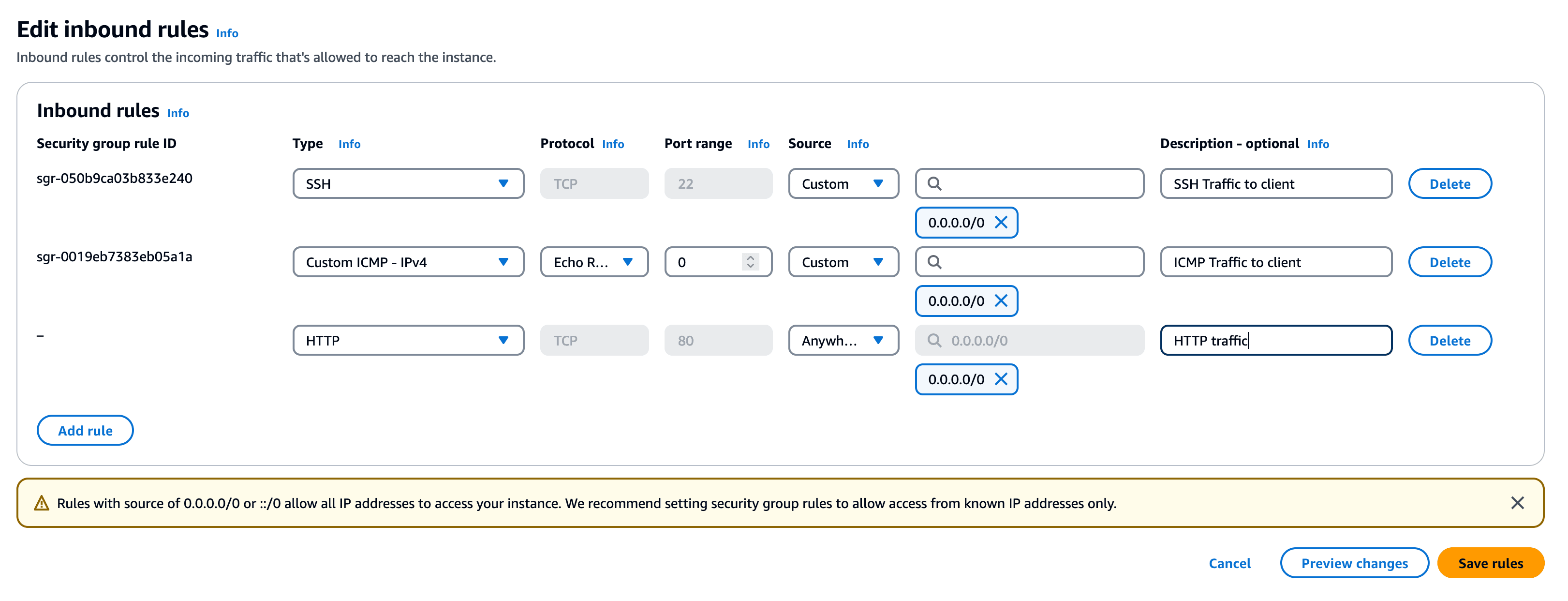
product-test-server.clickhouse-dev.com. 300 IN A 34.248.59.9- 在服务器上开放 80 端口。该端口将用于通过 certbot 和 ACME 协议自动续订证书。对于 AWS,可通过修改实例关联的安全组 (Security Group) 来实现。
- 安装
certbot,例如使用apt
sudo apt install certbot- 获取 SSL 证书
sudo certbot certonly
Saving debug log to /var/log/letsencrypt/letsencrypt.log

How would you like to authenticate with the ACME CA?
- - - - - - - - - - - - - - - - - - - - - - - - - - - - - - - - - - - - - - - -
1: Spin up a temporary webserver (standalone)
2: Place files in webroot directory (webroot)
- - - - - - - - - - - - - - - - - - - - - - - - - - - - - - - - - - - - - - - -
Select the appropriate number [1-2] then [enter] (press 'c' to cancel): 1
Please enter the domain name(s) you would like on your certificate (comma and/or
space separated) (Enter 'c' to cancel): product-test-server.clickhouse-dev.com
Requesting a certificate for product-test-server.clickhouse-dev.com

Successfully received certificate.
Certificate is saved at: /etc/letsencrypt/live/product-test-server.clickhouse-dev.com/fullchain.pem
Key is saved at:         /etc/letsencrypt/live/product-test-server.clickhouse-dev.com/privkey.pem
This certificate expires on 2025-03-12.
These files will be updated when the certificate renews.
Certbot has set up a scheduled task to automatically renew this certificate in the background.

- - - - - - - - - - - - - - - - - - - - - - - - - - - - - - - - - - - - - - - -
If you like Certbot, please consider supporting our work by:
 * Donating to ISRG / Let's Encrypt:   https://letsencrypt.org/donate
* Donating to EFF: https://eff.org/donate-le系统提示时,输入服务器的完整域名,例如 product-test-server.clickhouse-dev.com。
- 将证书复制到 ClickHouse 目录中。
echo '* * * * * root cp -u /etc/letsencrypt/live/product-test-server.clickhouse-dev.com/*.pem /etc/clickhouse-server/ && chown clickhouse:clickhouse /etc/clickhouse-server/*.pem && chmod 400 /etc/clickhouse-server/*.pem' | sudo tee /etc/cron.d/copy-certificates此命令会设置一个 cron 作业,用于自动管理 ClickHouse 服务器的 Let's Encrypt SSL 证书。它会以 root 用户身份每分钟运行一次,仅在文件发生更新时,才将 Let's Encrypt 目录中的 .pem 文件复制到 ClickHouse 服务器的配置目录。复制完成后,脚本会将这些文件的所有者更改为 clickhouse 用户和组,以确保服务器具备所需的访问权限。它还会对复制后的文件设置安全的只读权限 (chmod 400) ,以确保严格的文件安全性。这样,ClickHouse 服务器始终都能访问最新的 SSL 证书,无需手动干预,从而在保障安全性的同时尽可能降低运维开销。
- 在 clickhouse-server 中配置这些证书的使用。
echo "https_port: 8443
tcp_port_secure: 9440
openSSL:
 server:
 certificateFile: '/etc/clickhouse-server/fullchain.pem'
 privateKeyFile: '/etc/clickhouse-server/privkey.pem'
disableProtocols: 'sslv2,sslv3,tlsv1,tlsv1_1'" | sudo tee /etc/clickhouse-server/config.d/ssl.yaml- 重启 ClickHouse 服务器
sudo clickhouse restart- 验证 ClickHouse 能否通过 SSL 进行通信
curl https://product-test-server.clickhouse-dev.com:8443/

Ok.
要使最后一步正常工作,你可能需要确保 8443 端口可访问,例如在 AWS 的安全组 (Security Group) 中放行该端口。或者,如果你只想从服务器访问 ClickHouse,请修改 hosts 文件,即:
echo "127.0.0.1 product-test-server.clickhouse-dev.com" | sudo tee -a /etc/hosts如果你是从运行 ClickHouse 的本机发起连接,以下配置也应适用。要通过 product-test-server.clickhouse-dev.com 连接,请在你的环境中开放 9440 端口:
clickhouse client --secure --user default --password <password>