

 Set up docs MCP
Descripción general
Este tutorial sigue el [tutorial de ClickHouse], pero ejecuta todas las consultas a través de pg_clickhouse.
Elija cómo desea configurar pg_clickhouse:
- Desde la consola si utiliza ClickHouse Managed Postgres.
- Desde PSQL si instala y configura la extensión usted mismo.
Iniciar ClickHouse
Primero, cree una base de datos en ClickHouse si aún no tiene una. Una forma rápida de empezar es usar la imagen de Docker:
docker run -d --network host --name clickhouse -p 8123:8123 -p9000:9000 --ulimit nofile=262144:262144 clickhouse
docker exec -it clickhouse clickhouse-client
Crear una tabla
Tomemos como referencia el [tutorial de ClickHouse] para crear una base de datos sencilla con el conjunto de datos de taxis de la ciudad de Nueva York:
CREATE DATABASE taxi;
CREATE TABLE taxi.trips
(
    trip_id UInt32,
    vendor_id Enum8(
        '1'      =  1, '2'      =  2, '3'      =  3, '4'      =  4,
        'CMT'    =  5, 'VTS'    =  6, 'DDS'    =  7, 'B02512' = 10,
        'B02598' = 11, 'B02617' = 12, 'B02682' = 13, 'B02764' = 14,
        ''       = 15
    ),
    pickup_date Date,
    pickup_datetime DateTime,
    dropoff_date Date,
    dropoff_datetime DateTime,
    store_and_fwd_flag UInt8,
    rate_code_id UInt8,
    pickup_longitude Float64,
    pickup_latitude Float64,
    dropoff_longitude Float64,
    dropoff_latitude Float64,
    passenger_count UInt8,
    trip_distance Float64,
    fare_amount Decimal(10, 2),
    extra Decimal(10, 2),
    mta_tax Decimal(10, 2),
    tip_amount Decimal(10, 2),
    tolls_amount Decimal(10, 2),
    ehail_fee Decimal(10, 2),
    improvement_surcharge Decimal(10, 2),
    total_amount Decimal(10, 2),
    payment_type Enum8('UNK' = 0, 'CSH' = 1, 'CRE' = 2, 'NOC' = 3, 'DIS' = 4),
    trip_type UInt8,
    pickup FixedString(25),
    dropoff FixedString(25),
    cab_type Enum8('yellow' = 1, 'green' = 2, 'uber' = 3),
    pickup_nyct2010_gid Int8,
    pickup_ctlabel Float32,
    pickup_borocode Int8,
    pickup_ct2010 String,
    pickup_boroct2010 String,
    pickup_cdeligibil String,
    pickup_ntacode FixedString(4),
    pickup_ntaname String,
    pickup_puma UInt16,
    dropoff_nyct2010_gid UInt8,
    dropoff_ctlabel Float32,
    dropoff_borocode UInt8,
    dropoff_ct2010 String,
    dropoff_boroct2010 String,
    dropoff_cdeligibil String,
    dropoff_ntacode FixedString(4),
    dropoff_ntaname String,
    dropoff_puma UInt16
)
ENGINE = MergeTree
PARTITION BY toYYYYMM(pickup_date)
ORDER BY pickup_datetime;
Añade el conjunto de datos
Y luego importa los datos:
INSERT INTO taxi.trips
SELECT * FROM s3(
    'https://datasets-documentation.s3.eu-west-3.amazonaws.com/nyc-taxi/trips_{1..2}.gz',
    'TabSeparatedWithNames', "
    trip_id UInt32,
    vendor_id Enum8(
        '1'      =  1, '2'      =  2, '3'      =  3, '4'      =  4,
        'CMT'    =  5, 'VTS'    =  6, 'DDS'    =  7, 'B02512' = 10,
        'B02598' = 11, 'B02617' = 12, 'B02682' = 13, 'B02764' = 14,
        ''       = 15
    ),
    pickup_date Date,
    pickup_datetime DateTime,
    dropoff_date Date,
    dropoff_datetime DateTime,
    store_and_fwd_flag UInt8,
    rate_code_id UInt8,
    pickup_longitude Float64,
    pickup_latitude Float64,
    dropoff_longitude Float64,
    dropoff_latitude Float64,
    passenger_count UInt8,
    trip_distance Float64,
    fare_amount Decimal(10, 2),
    extra Decimal(10, 2),
    mta_tax Decimal(10, 2),
    tip_amount Decimal(10, 2),
    tolls_amount Decimal(10, 2),
    ehail_fee Decimal(10, 2),
    improvement_surcharge Decimal(10, 2),
    total_amount Decimal(10, 2),
    payment_type Enum8('UNK' = 0, 'CSH' = 1, 'CRE' = 2, 'NOC' = 3, 'DIS' = 4),
    trip_type UInt8,
    pickup FixedString(25),
    dropoff FixedString(25),
    cab_type Enum8('yellow' = 1, 'green' = 2, 'uber' = 3),
    pickup_nyct2010_gid Int8,
    pickup_ctlabel Float32,
    pickup_borocode Int8,
    pickup_ct2010 String,
    pickup_boroct2010 String,
    pickup_cdeligibil String,
    pickup_ntacode FixedString(4),
    pickup_ntaname String,
    pickup_puma UInt16,
    dropoff_nyct2010_gid UInt8,
    dropoff_ctlabel Float32,
    dropoff_borocode UInt8,
    dropoff_ct2010 String,
    dropoff_boroct2010 String,
    dropoff_cdeligibil String,
    dropoff_ntacode FixedString(4),
    dropoff_ntaname String,
    dropoff_puma UInt16
") SETTINGS input_format_try_infer_datetimes = 0
Asegúrate de poder consultarlo y luego sal del cliente:
SELECT count() FROM taxi.trips;
quit
Desde la consola
Si utiliza ClickHouse Managed Postgres, puede configurar
pg_clickhouse y conectarse a un servicio de ClickHouse desde la consola de ClickHouse Cloud.
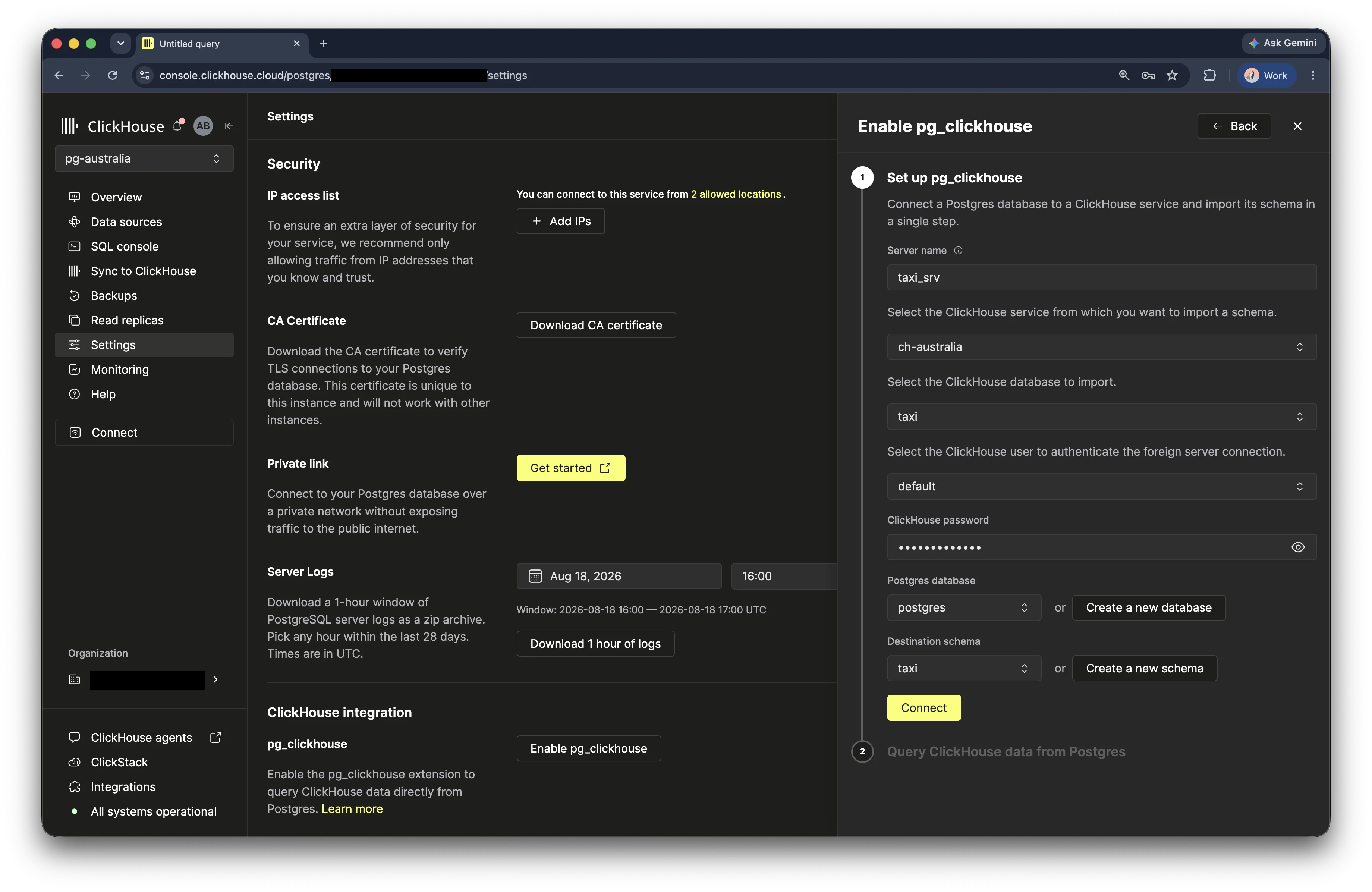
Abra su servicio de Managed Postgres, seleccione Configuración y busque la
sección Integración de ClickHouse. Haga clic en Habilitar pg_clickhouse.
En el formulario de configuración, introduzca un nombre para el servidor externo. Seleccione el servicio de ClickHouse, la base de datos en ClickHouse y el usuario que se utilizarán para la conexión. Introduzca la contraseña de ClickHouse y, a continuación, seleccione la base de datos de Postgres y el esquema de destino en el que se importarán las tablas de ClickHouse. Haga clic en Conectar para crear el servidor externo e importar el esquema.
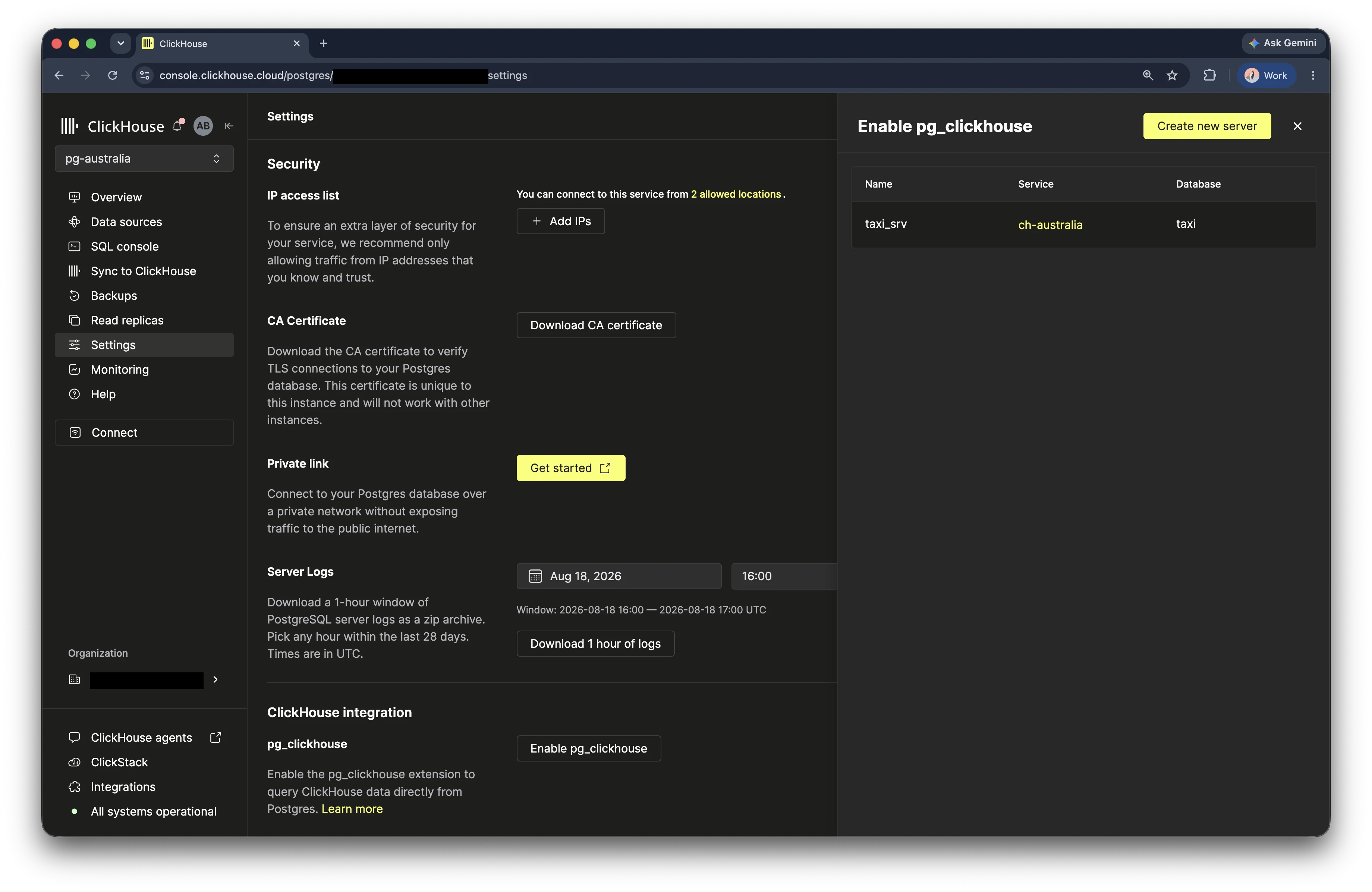
Cuando finalice la configuración, la consola mostrará una confirmación y el servidor externo aparecerá en la lista de servidores.
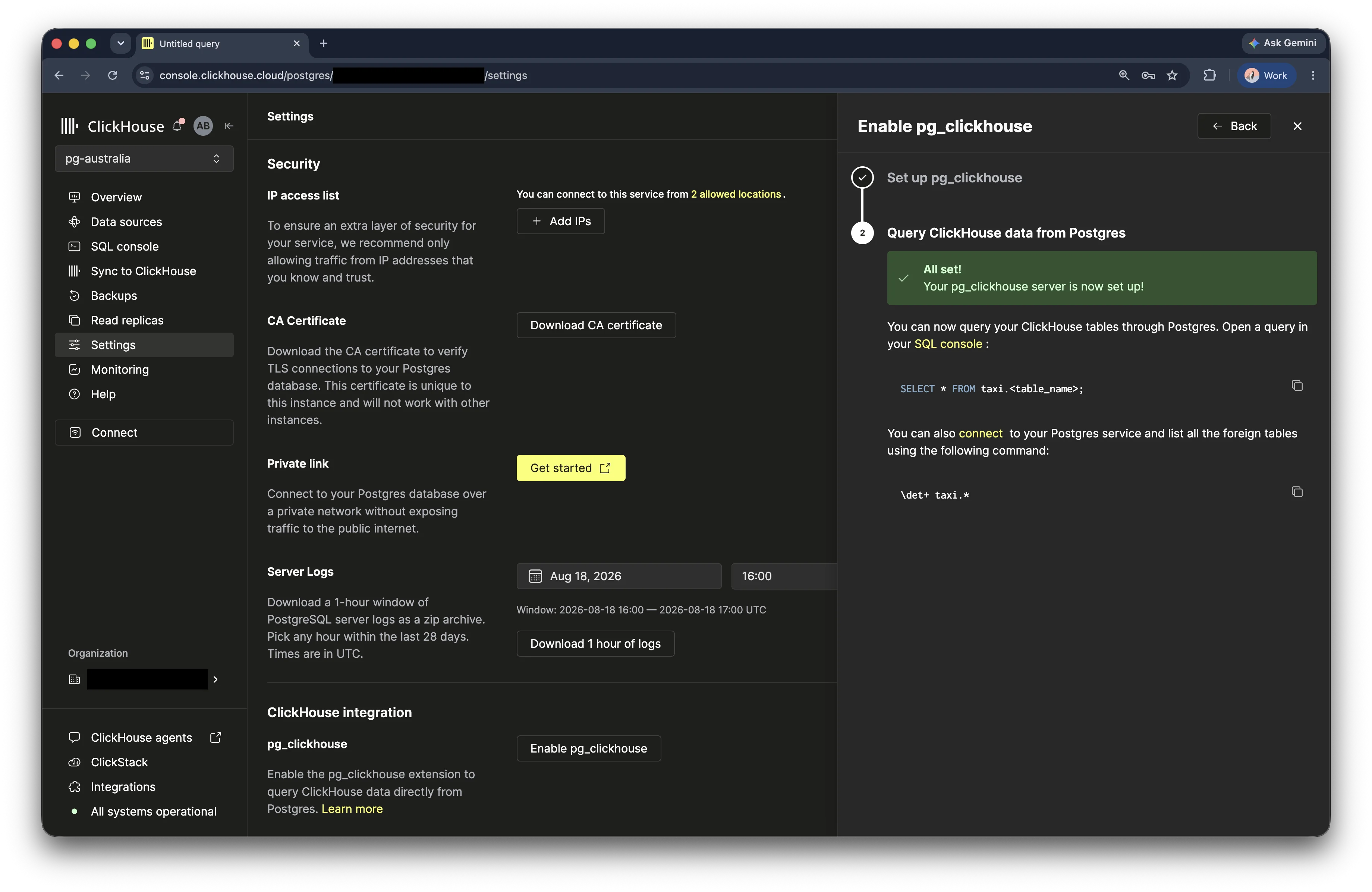
Ahora puede abrir la consola SQL de Postgres y consultar las tablas importadas:
SELECT * FROM <schema>.<table>;Para seguir los ejemplos de taxis de este tutorial, selecciona la base de datos taxi en ClickHouse
e impórtala en el esquema de destino taxi.
Desde PSQL
Instalar pg_clickhouse
Compila e instala pg_clickhouse desde PGXN o GitHub. O bien, inicia un contenedor de Docker con la [imagen de pg_clickhouse], que simplemente añade pg_clickhouse a la [imagen de Postgres] de Docker:
docker run -d --network host --name pg_clickhouse -e POSTGRES_PASSWORD=my_pass \
       -d ghcr.io/clickhouse/pg_clickhouse:18
Conectar pg_clickhouse
Ahora, conéctese a Postgres:
docker exec -it pg_clickhouse psql -U postgresY cree pg_clickhouse:
CREATE EXTENSION pg_clickhouse;Cree un servidor externo usando el nombre del host, el puerto y la base de datos de su base de datos en ClickHouse.
CREATE SERVER taxi_srv FOREIGN DATA WRAPPER clickhouse_fdw
       OPTIONS(driver 'binary', host 'localhost', dbname 'taxi');
Aquí hemos optado por usar el controlador binario, que utiliza el protocolo binario de ClickHouse. También puede usar el controlador "http", que utiliza la interfaz HTTP.
A continuación, asigne un usuario de PostgreSQL a uno de ClickHouse. La forma más sencilla de hacerlo es asignar el usuario actual de PostgreSQL a un usuario remoto para el servidor externo:
CREATE USER MAPPING FOR CURRENT_USER SERVER taxi_srv
       OPTIONS (user 'default');
También puedes especificar la opción password.
Ahora, agrega la tabla taxi; simplemente importa todas las tablas de la base de datos remota de ClickHouse a un esquema de Postgres:
CREATE SCHEMA taxi;
IMPORT FOREIGN SCHEMA taxi FROM SERVER taxi_srv INTO taxi;
Y ahora la tabla debería haberse importado: en psql, usa \det+ para verla:
taxi=# \det+ taxi.*
                                       List of foreign tables
 Schema | Table |  Server  |                        FDW options                        | Description
--------+-------+----------+-----------------------------------------------------------+-------------
 taxi   | trips | taxi_srv | (database 'taxi', table_name 'trips', engine 'MergeTree') | [null]
(1 row)
¡Listo! Usa \d para mostrar todas las columnas:
taxi=# \d taxi.trips
                                   Foreign table "taxi.trips"
        Column         |           Type           | Collation | Nullable | Default | FDW options
-----------------------+--------------------------+-----------+----------+---------+-------------
 trip_id               | bigint                   |           | not null |         |
 vendor_id             | text                     |           | not null |         |
 pickup_date           | date                     |           | not null |         |
 pickup_datetime       | timestamp with time zone |           | not null |         |
 dropoff_date          | date                     |           | not null |         |
 dropoff_datetime      | timestamp with time zone |           | not null |         |
 store_and_fwd_flag    | smallint                 |           | not null |         |
 rate_code_id          | smallint                 |           | not null |         |
 pickup_longitude      | double precision         |           | not null |         |
 pickup_latitude       | double precision         |           | not null |         |
 dropoff_longitude     | double precision         |           | not null |         |
 dropoff_latitude      | double precision         |           | not null |         |
 passenger_count       | smallint                 |           | not null |         |
 trip_distance         | double precision         |           | not null |         |
 fare_amount           | numeric(10,2)            |           | not null |         |
 extra                 | numeric(10,2)            |           | not null |         |
 mta_tax               | numeric(10,2)            |           | not null |         |
 tip_amount            | numeric(10,2)            |           | not null |         |
 tolls_amount          | numeric(10,2)            |           | not null |         |
 ehail_fee             | numeric(10,2)            |           | not null |         |
 improvement_surcharge | numeric(10,2)            |           | not null |         |
 total_amount          | numeric(10,2)            |           | not null |         |
 payment_type          | text                     |           | not null |         |
 trip_type             | smallint                 |           | not null |         |
 pickup                | character varying(25)    |           | not null |         |
 dropoff               | character varying(25)    |           | not null |         |
 cab_type              | text                     |           | not null |         |
 pickup_nyct2010_gid   | smallint                 |           | not null |         |
 pickup_ctlabel        | real                     |           | not null |         |
 pickup_borocode       | smallint                 |           | not null |         |
 pickup_ct2010         | text                     |           | not null |         |
 pickup_boroct2010     | text                     |           | not null |         |
 pickup_cdeligibil     | text                     |           | not null |         |
 pickup_ntacode        | character varying(4)     |           | not null |         |
 pickup_ntaname        | text                     |           | not null |         |
 pickup_puma           | integer                  |           | not null |         |
 dropoff_nyct2010_gid  | smallint                 |           | not null |         |
 dropoff_ctlabel       | real                     |           | not null |         |
 dropoff_borocode      | smallint                 |           | not null |         |
 dropoff_ct2010        | text                     |           | not null |         |
 dropoff_boroct2010    | text                     |           | not null |         |
 dropoff_cdeligibil    | text                     |           | not null |         |
 dropoff_ntacode       | character varying(4)     |           | not null |         |
 dropoff_ntaname       | text                     |           | not null |         |
 dropoff_puma          | integer                  |           | not null |         |
Server: taxi_srv
FDW options: (database 'taxi', table_name 'trips', engine 'MergeTree')
Ahora, consulta la tabla:
 SELECT count(*) FROM taxi.trips;
   count
 ---------
  1999657
 (1 fila)
Observa con qué rapidez se ejecutó la consulta. pg_clickhouse delega toda la
consulta, incluida la agregación COUNT(), por lo que se ejecuta en ClickHouse y solo
devuelve una única fila a Postgres. Usa EXPLAIN para verlo:
 EXPLAIN select count(*) from taxi.trips;
                    QUERY PLAN
 -------------------------------------------------
  Foreign Scan  (cost=1.00..-0.90 rows=1 width=8)
    Relations: Aggregate on (trips)
 (2 rows)
Ten en cuenta que "Foreign Scan" aparece en la raíz del plan, lo que significa que la consulta completa se ejecutó en ClickHouse.
Analiza los datos
Ejecuta algunas consultas para analizar los datos. Revisa los siguientes ejemplos o prueba tu propia consulta SQL.
-
Calcula el importe medio de la propina:
taxi=# \timing Timing is on. taxi=# SELECT round(avg(tip_amount), 2) FROM taxi.trips; round ------- 1.68 (1 row) Time: 9.438 ms -
Calcule el coste medio en función del número de pasajeros:
taxi=# SELECT passenger_count, avg(total_amount)::NUMERIC(10, 2) AS average_total_amount FROM taxi.trips GROUP BY passenger_count; passenger_count | average_total_amount -----------------+---------------------- 0 | 22.68 1 | 15.96 2 | 17.14 3 | 16.75 4 | 17.32 5 | 16.34 6 | 16.03 7 | 59.79 8 | 36.40 9 | 9.79 (10 rows) Time: 27.266 ms -
Calcula el número diario de recogidas por barrio:
taxi=# SELECT pickup_date, pickup_ntaname, SUM(1) AS number_of_trips FROM taxi.trips GROUP BY pickup_date, pickup_ntaname ORDER BY pickup_date ASC LIMIT 10; pickup_date | pickup_ntaname | number_of_trips -------------+--------------------------------+----------------- 2015-07-01 | Williamsburg | 1 2015-07-01 | park-cemetery-etc-Queens | 6 2015-07-01 | Maspeth | 1 2015-07-01 | Stuyvesant Town-Cooper Village | 44 2015-07-01 | Rego Park | 1 2015-07-01 | Greenpoint | 7 2015-07-01 | Highbridge | 1 2015-07-01 | Briarwood-Jamaica Hills | 3 2015-07-01 | Airport | 550 2015-07-01 | East Harlem North | 32 (10 rows) Time: 30.978 ms -
Calcula la duración de cada viaje en minutos y luego agrupa los resultados según la duración del viaje:
taxi=# SELECT avg(tip_amount) AS avg_tip, avg(fare_amount) AS avg_fare, avg(passenger_count) AS avg_passenger, count(*) AS count, round((date_part('epoch', dropoff_datetime) - date_part('epoch', pickup_datetime)) / 60) as trip_minutes FROM taxi.trips WHERE round((date_part('epoch', dropoff_datetime) - date_part('epoch', pickup_datetime)) / 60) > 0 GROUP BY trip_minutes ORDER BY trip_minutes DESC LIMIT 5; avg_tip | avg_fare | avg_passenger | count | trip_minutes -------------------+------------------+------------------+-------+-------------- 1.96 | 8 | 1 | 1 | 27512 0 | 12 | 2 | 1 | 27500 0.562727272727273 | 17.4545454545455 | 2.45454545454545 | 11 | 1440 0.716564885496183 | 14.2786259541985 | 1.94656488549618 | 131 | 1439 1.00945205479452 | 12.8787671232877 | 1.98630136986301 | 146 | 1438 (5 rows) Time: 45.477 ms -
Muestra el número de recogidas en cada barrio, desglosado por hora del día:
taxi=# SELECT pickup_ntaname, date_part('hour', pickup_datetime) as pickup_hour, SUM(1) AS pickups FROM taxi.trips WHERE pickup_ntaname != '' GROUP BY pickup_ntaname, pickup_hour ORDER BY pickup_ntaname, date_part('hour', pickup_datetime) LIMIT 5; pickup_ntaname | pickup_hour | pickups ----------------+-------------+--------- Airport | 0 | 3509 Airport | 1 | 1184 Airport | 2 | 401 Airport | 3 | 152 Airport | 4 | 213 (5 rows) Time: 36.895 ms -
Configura la zona horaria de visualización para Nueva York y consulta los viajes a los aeropuertos LaGuardia o JFK:
taxi=# SET timezone = 'America/New_York';
SET
taxi=# SELECT
    pickup_datetime,
    dropoff_datetime,
    total_amount,
    pickup_nyct2010_gid,
    dropoff_nyct2010_gid,
    CASE
        WHEN dropoff_nyct2010_gid = 138 THEN 'LGA'
        WHEN dropoff_nyct2010_gid = 132 THEN 'JFK'
    END AS airport_code,
    EXTRACT(YEAR FROM pickup_datetime) AS year,
    EXTRACT(DAY FROM pickup_datetime) AS day,
    EXTRACT(HOUR FROM pickup_datetime) AS hour
FROM taxi.trips
WHERE dropoff_nyct2010_gid IN (132, 138)
ORDER BY pickup_datetime
LIMIT 5;
    pickup_datetime     |    dropoff_datetime    | total_amount | pickup_nyct2010_gid | dropoff_nyct2010_gid | airport_code | year | day | hour
------------------------+------------------------+--------------+---------------------+----------------------+--------------+------+-----+------
 2015-06-30 20:04:14-04 | 2015-06-30 20:15:29-04 |        13.30 |                 -34 |                  132 | JFK          | 2015 |  30 |   20
 2015-06-30 20:09:42-04 | 2015-06-30 20:12:55-04 |         6.80 |                  50 |                  138 | LGA          | 2015 |  30 |   20
 2015-06-30 20:23:04-04 | 2015-06-30 20:24:39-04 |         4.80 |                -125 |                  132 | JFK          | 2015 |  30 |   20
 2015-06-30 20:27:51-04 | 2015-06-30 20:39:02-04 |        14.72 |                -101 |                  138 | LGA          | 2015 |  30 |   20
 2015-06-30 20:32:03-04 | 2015-06-30 20:55:39-04 |        39.34 |                  48 |                  138 | LGA          | 2015 |  30 |   20
(5 rows)

Time: 17.450 ms
Crear un diccionario
Crea un diccionario asociado a una tabla de tu servicio de ClickHouse. La tabla y el diccionario se basan en un archivo CSV que contiene una fila por cada barrio de la ciudad de Nueva York.
Los barrios se corresponden con los nombres de los cinco distritos de la ciudad de Nueva York (Bronx, Brooklyn, Manhattan, Queens y Staten Island), así como con el Aeropuerto de Newark (EWR).
Aquí tienes un fragmento del archivo CSV que estás usando, en formato de tabla. La
columna LocationID del archivo se corresponde con las columnas pickup_nyct2010_gid y
dropoff_nyct2010_gid de tu tabla de viajes:
| LocationID | Borough | Zone | service_zone |
|---|---|---|---|
| 1 | EWR | Newark Airport | EWR |
| 2 | Queens | Jamaica Bay | Boro Zone |
| 3 | Bronx | Allerton/Pelham Gardens | Boro Zone |
| 4 | Manhattan | Alphabet City | Yellow Zone |
| 5 | Staten Island | Arden Heights | Boro Zone |
-
Aún en Postgres, usa la función
clickhouse_raw_querypara crear un [Diccionario] de ClickHouse llamadotaxi_zone_dictionaryy rellenarlo a partir del archivo CSV en S3:CALL clickhouse_perform('taxi_srv', $$ CREATE DICTIONARY taxi.taxi_zone_dictionary ( LocationID Int64 DEFAULT 0, Borough String, zone String, service_zone String ) PRIMARY KEY LocationID SOURCE(HTTP(URL 'https://datasets-documentation.s3.eu-west-3.amazonaws.com/nyc-taxi/taxi_zone_lookup.csv' FORMAT 'CSVWithNames')) LIFETIME(MIN 0 MAX 0) LAYOUT(HASHED_ARRAY()) $$);- Ahora impórtalo:
IMPORT FOREIGN SCHEMA taxi LIMIT TO (taxi_zone_dictionary) FROM SERVER taxi_srv INTO taxi;- Confirma que se puede consultar:
taxi=# SELECT * FROM taxi.taxi_zone_dictionary limit 3; LocationID | Borough | Zone | service_zone ------------+-----------+-----------------------------------------------+-------------- 77 | Brooklyn | East New York/Pennsylvania Avenue | Boro Zone 106 | Brooklyn | Gowanus | Boro Zone 103 | Manhattan | Governor's Island/Ellis Island/Liberty Island | Yellow Zone (3 rows)- Excelente. Ahora utiliza la función
dictGetpara obtener el nombre de un distrito en una consulta. Esta consulta suma el número de viajes en taxi por distrito que terminan en el aeropuerto de LaGuardia o en el JFK:
taxi=# SELECT
        count(1) AS total,
        COALESCE(NULLIF(dictGet(
            'taxi.taxi_zone_dictionary', 'Borough',
            toUInt64(pickup_nyct2010_gid)
        ), ''), 'Unknown') AS borough_name
    FROM taxi.trips
    WHERE dropoff_nyct2010_gid = 132 OR dropoff_nyct2010_gid = 138
    GROUP BY borough_name
    ORDER BY total DESC;
 total | borough_name
-------+---------------
 23683 | Unknown
  7053 | Manhattan
  6828 | Brooklyn
  4458 | Queens
  2670 | Bronx
   554 | Staten Island
    53 | EWR
(7 rows)

Time: 66.245 ms
Esta consulta suma el número de viajes en taxi por distrito que terminan en los aeropuertos LaGuardia o JFK. Fíjate en que hay bastantes viajes en los que se desconoce el barrio de recogida.
Realiza un JOIN
Escribe algunas consultas que hagan un JOIN entre taxi_zone_dictionary y tu tabla
trips.
-
Empieza con un
JOINsimple que funcione de forma similar a la consulta anterior sobre aeropuertos:taxi=# SELECT count(1) AS total, "Borough" FROM taxi.trips JOIN taxi.taxi_zone_dictionary ON trips.pickup_nyct2010_gid = toUInt64(taxi.taxi_zone_dictionary."LocationID") WHERE pickup_nyct2010_gid > 0 AND dropoff_nyct2010_gid IN (132, 138) GROUP BY "Borough" ORDER BY total DESC; total | borough_name -------+--------------- 7053 | Manhattan 6828 | Brooklyn 4458 | Queens 2670 | Bronx 554 | Staten Island 53 | EWR (6 rows) Time: 48.449 mstaxi=# explain SELECT count(1) AS total, "Borough" FROM taxi.trips JOIN taxi.taxi_zone_dictionary ON trips.pickup_nyct2010_gid = toUInt64(taxi.taxi_zone_dictionary."LocationID") WHERE pickup_nyct2010_gid > 0 AND dropoff_nyct2010_gid IN (132, 138) GROUP BY "Borough" ORDER BY total DESC; QUERY PLAN ----------------------------------------------------------------------- Foreign Scan (cost=1.00..5.10 rows=1000 width=40) Relations: Aggregate on ((trips) INNER JOIN (taxi_zone_dictionary)) (2 rows) Time: 2.012 ms -
Esta consulta devuelve las filas correspondientes a los 1000 viajes con la propina más alta y luego realiza un INNER JOIN de cada fila con el diccionario:
taxi=# SELECT *
FROM taxi.trips
JOIN taxi.taxi_zone_dictionary
    ON trips.dropoff_nyct2010_gid = taxi.taxi_zone_dictionary."LocationID"
WHERE tip_amount > 0
ORDER BY tip_amount DESC
LIMIT 1000;