

 Set up docs MCP
概要
このチュートリアルは [ClickHouse チュートリアル] に沿って進めますが、すべてのクエリを pg_clickhouse 経由で実行します。
pg_clickhouse の構成方法を選択します。
- ClickHouse Managed Postgres を使用している場合は、Console から。
- 拡張機能を自分でインストールして構成する場合は、PSQL から。
ClickHouse を起動する
まず、ClickHouse のデータベースがまだない場合は作成します。手早く始めるには、 Docker イメージ を使うのが簡単です。
docker run -d --network host --name clickhouse -p 8123:8123 -p9000:9000 --ulimit nofile=262144:262144 clickhouse
docker exec -it clickhouse clickhouse-client
テーブルを作成する
シンプルなデータベースを作成するために、[ClickHouse チュートリアル]にある The New York City taxi データセットを使ってみましょう。
CREATE DATABASE taxi;
CREATE TABLE taxi.trips
(
    trip_id UInt32,
    vendor_id Enum8(
        '1'      =  1, '2'      =  2, '3'      =  3, '4'      =  4,
        'CMT'    =  5, 'VTS'    =  6, 'DDS'    =  7, 'B02512' = 10,
        'B02598' = 11, 'B02617' = 12, 'B02682' = 13, 'B02764' = 14,
        ''       = 15
    ),
    pickup_date Date,
    pickup_datetime DateTime,
    dropoff_date Date,
    dropoff_datetime DateTime,
    store_and_fwd_flag UInt8,
    rate_code_id UInt8,
    pickup_longitude Float64,
    pickup_latitude Float64,
    dropoff_longitude Float64,
    dropoff_latitude Float64,
    passenger_count UInt8,
    trip_distance Float64,
    fare_amount Decimal(10, 2),
    extra Decimal(10, 2),
    mta_tax Decimal(10, 2),
    tip_amount Decimal(10, 2),
    tolls_amount Decimal(10, 2),
    ehail_fee Decimal(10, 2),
    improvement_surcharge Decimal(10, 2),
    total_amount Decimal(10, 2),
    payment_type Enum8('UNK' = 0, 'CSH' = 1, 'CRE' = 2, 'NOC' = 3, 'DIS' = 4),
    trip_type UInt8,
    pickup FixedString(25),
    dropoff FixedString(25),
    cab_type Enum8('yellow' = 1, 'green' = 2, 'uber' = 3),
    pickup_nyct2010_gid Int8,
    pickup_ctlabel Float32,
    pickup_borocode Int8,
    pickup_ct2010 String,
    pickup_boroct2010 String,
    pickup_cdeligibil String,
    pickup_ntacode FixedString(4),
    pickup_ntaname String,
    pickup_puma UInt16,
    dropoff_nyct2010_gid UInt8,
    dropoff_ctlabel Float32,
    dropoff_borocode UInt8,
    dropoff_ct2010 String,
    dropoff_boroct2010 String,
    dropoff_cdeligibil String,
    dropoff_ntacode FixedString(4),
    dropoff_ntaname String,
    dropoff_puma UInt16
)
ENGINE = MergeTree
PARTITION BY toYYYYMM(pickup_date)
ORDER BY pickup_datetime;
データセットを追加する
次に、データをインポートします。
INSERT INTO taxi.trips
SELECT * FROM s3(
    'https://datasets-documentation.s3.eu-west-3.amazonaws.com/nyc-taxi/trips_{1..2}.gz',
    'TabSeparatedWithNames', "
    trip_id UInt32,
    vendor_id Enum8(
        '1'      =  1, '2'      =  2, '3'      =  3, '4'      =  4,
        'CMT'    =  5, 'VTS'    =  6, 'DDS'    =  7, 'B02512' = 10,
        'B02598' = 11, 'B02617' = 12, 'B02682' = 13, 'B02764' = 14,
        ''       = 15
    ),
    pickup_date Date,
    pickup_datetime DateTime,
    dropoff_date Date,
    dropoff_datetime DateTime,
    store_and_fwd_flag UInt8,
    rate_code_id UInt8,
    pickup_longitude Float64,
    pickup_latitude Float64,
    dropoff_longitude Float64,
    dropoff_latitude Float64,
    passenger_count UInt8,
    trip_distance Float64,
    fare_amount Decimal(10, 2),
    extra Decimal(10, 2),
    mta_tax Decimal(10, 2),
    tip_amount Decimal(10, 2),
    tolls_amount Decimal(10, 2),
    ehail_fee Decimal(10, 2),
    improvement_surcharge Decimal(10, 2),
    total_amount Decimal(10, 2),
    payment_type Enum8('UNK' = 0, 'CSH' = 1, 'CRE' = 2, 'NOC' = 3, 'DIS' = 4),
    trip_type UInt8,
    pickup FixedString(25),
    dropoff FixedString(25),
    cab_type Enum8('yellow' = 1, 'green' = 2, 'uber' = 3),
    pickup_nyct2010_gid Int8,
    pickup_ctlabel Float32,
    pickup_borocode Int8,
    pickup_ct2010 String,
    pickup_boroct2010 String,
    pickup_cdeligibil String,
    pickup_ntacode FixedString(4),
    pickup_ntaname String,
    pickup_puma UInt16,
    dropoff_nyct2010_gid UInt8,
    dropoff_ctlabel Float32,
    dropoff_borocode UInt8,
    dropoff_ct2010 String,
    dropoff_boroct2010 String,
    dropoff_cdeligibil String,
    dropoff_ntacode FixedString(4),
    dropoff_ntaname String,
    dropoff_puma UInt16
") SETTINGS input_format_try_infer_datetimes = 0
クエリできることを確認したら、クライアントを終了します:
SELECT count() FROM taxi.trips;
quit
コンソールから
ClickHouse Managed Postgres を使用している場合は、pg_clickhouse を設定し、ClickHouse Cloud
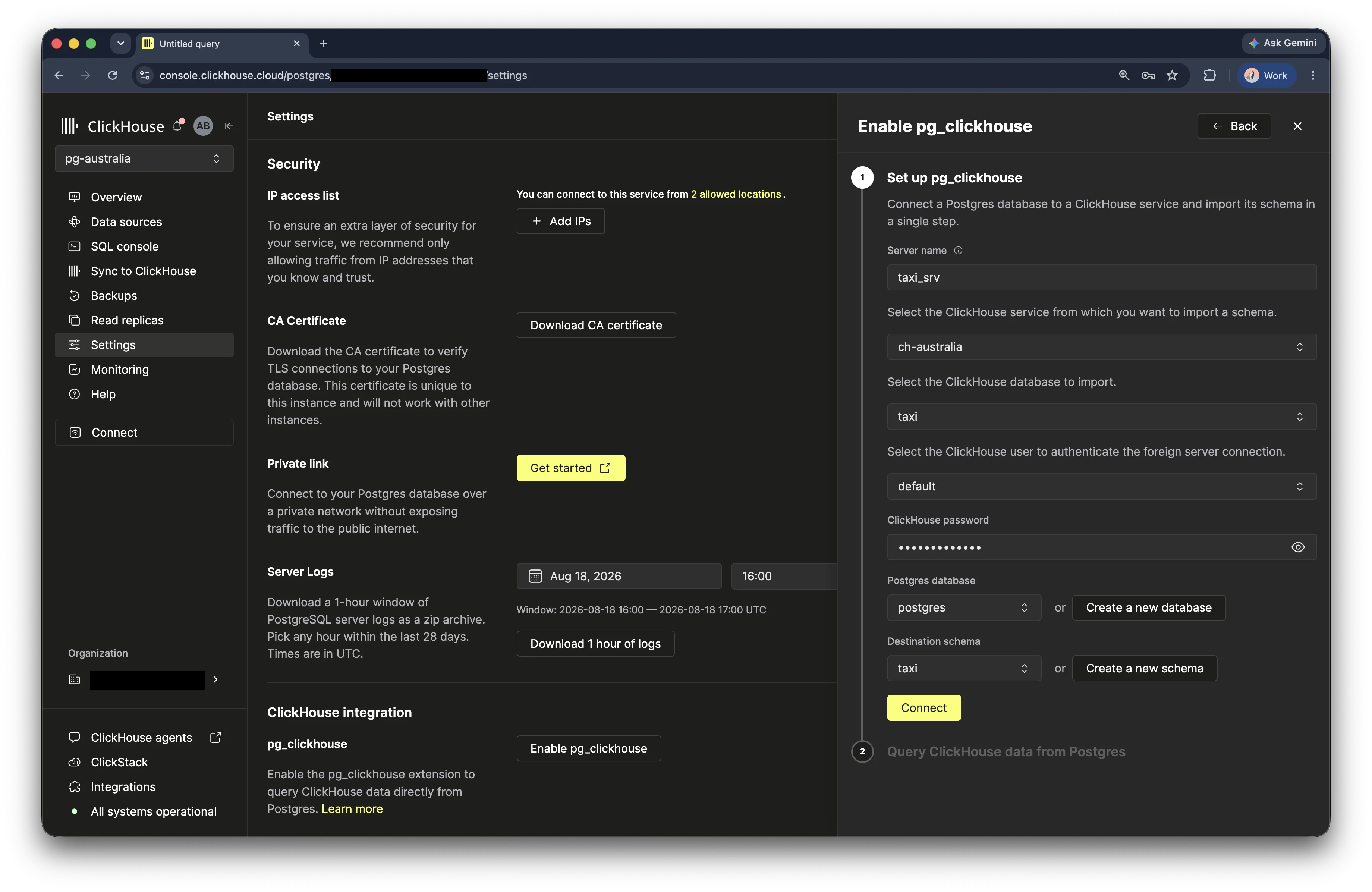
コンソールから ClickHouse サービスに接続できます。Managed Postgres サービスを開き、Settings を選択して、
ClickHouse integration セクションを探します。Enable pg_clickhouse をクリックします。
セットアップフォームで、foreign server の名前を入力します。接続に使用する ClickHouse サービス、データベース、ユーザーを選択します。ClickHouse のパスワードを入力し、ClickHouse テーブルのインポート先となる Postgres データベースと宛先スキーマを選択します。Connect をクリックして foreign server を作成し、スキーマをインポートします。
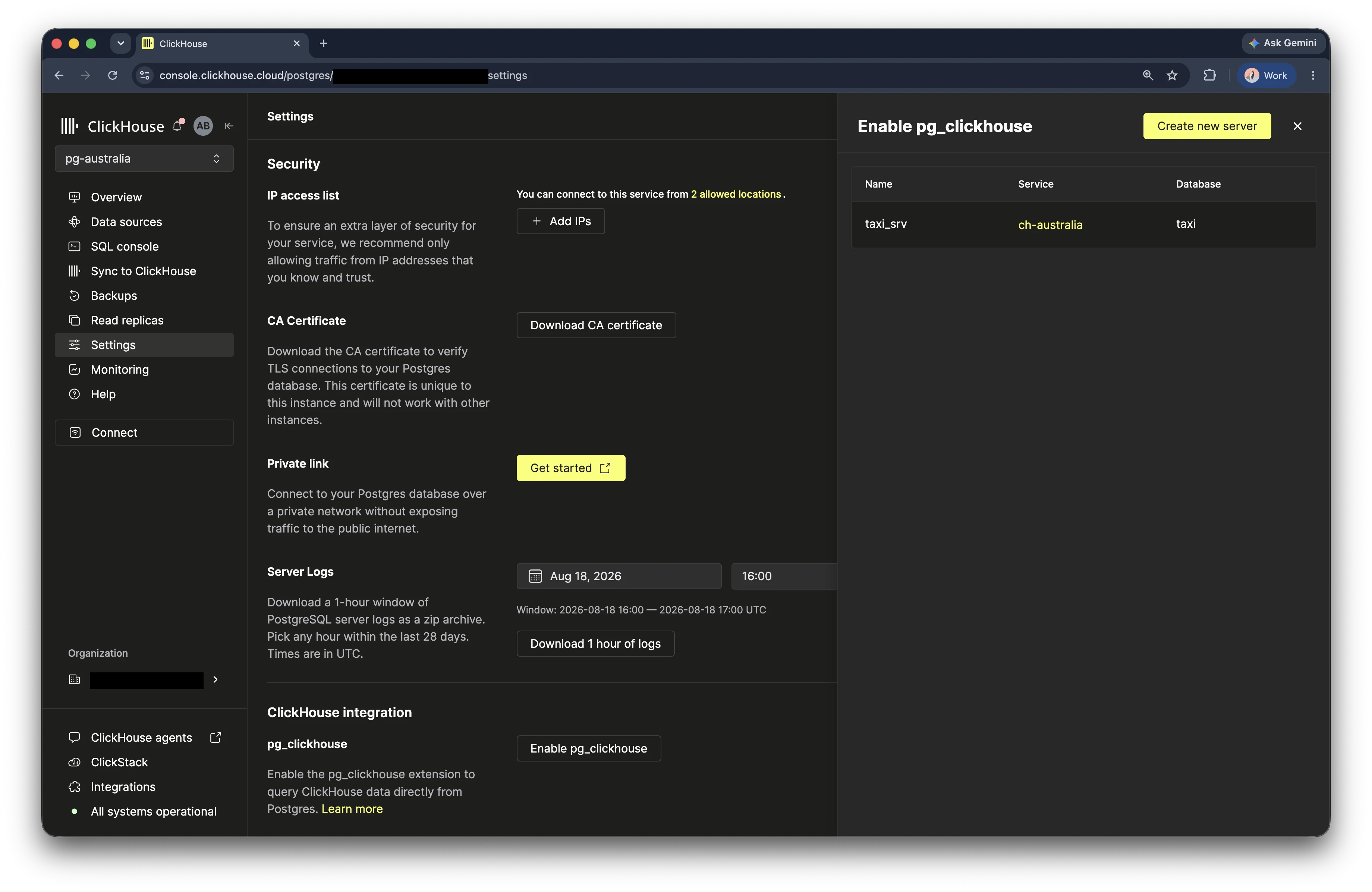
セットアップが完了すると、コンソールに確認メッセージが表示され、foreign server がサーバーリストに表示されます。
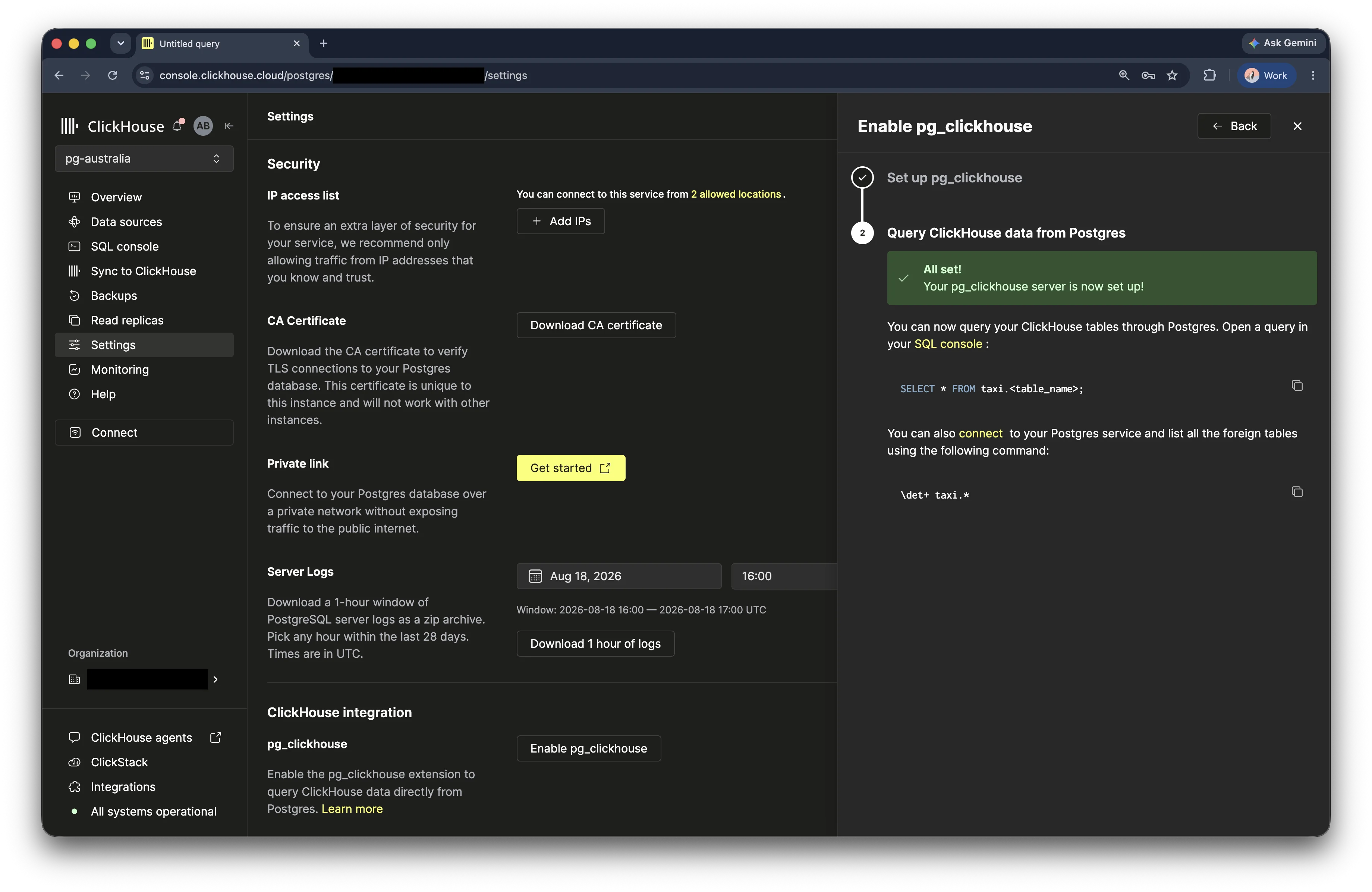
これで Postgres の SQL console を開き、インポートしたテーブルをクエリできます。
SELECT * FROM <schema>.<table>;このチュートリアルのタクシーの例に従うには、taxi ClickHouse
データベースを選択し、taxi 宛先スキーマにインポートします。
PSQL から
pg_clickhouse をインストールする
PGXN または GitHub から pg_clickhouse をビルドしてインストールします。あるいは、 [pg_clickhouse イメージ] を使用して Docker コンテナーを起動することもできます。これは Docker の Postgres イメージ に pg_clickhouse を追加しただけのイメージです。
docker run -d --network host --name pg_clickhouse -e POSTGRES_PASSWORD=my_pass \
       -d ghcr.io/clickhouse/pg_clickhouse:18
pg_clickhouse に接続する
次に、Postgres に接続します。
docker exec -it pg_clickhouse psql -U postgres次に、pg_clickhouse を作成します:
CREATE EXTENSION pg_clickhouse;ホスト名、ポート、お使いのClickHouseデータベース名を使用して、 foreign serverを作成します。
CREATE SERVER taxi_srv FOREIGN DATA WRAPPER clickhouse_fdw
       OPTIONS(driver 'binary', host 'localhost', dbname 'taxi');
ここでは、ClickHouse バイナリ プロトコルを使用するバイナリドライバーを選択しています。HTTP インターフェイスを使用する "http" ドライバーを使うこともできます。
次に、PostgreSQL ユーザーを ClickHouse ユーザーに対応付けます。これを行う最も簡単な方法は、 現在の PostgreSQL ユーザーを foreign server のリモートユーザーにそのまま対応付けることです:
CREATE USER MAPPING FOR CURRENT_USER SERVER taxi_srv
       OPTIONS (user 'default');
password オプションを指定することもできます。
次に、taxi テーブルを追加します。リモートの ClickHouseデータベースにあるすべてのテーブルを Postgres スキーマにインポートするだけです:
CREATE SCHEMA taxi;
IMPORT FOREIGN SCHEMA taxi FROM SERVER taxi_srv INTO taxi;
これでテーブルはインポートされているはずです: psql で \det+ を使うと確認できます:
taxi=# \det+ taxi.*
                                       List of foreign tables
 Schema | Table |  Server  |                        FDW options                        | Description
--------+-------+----------+-----------------------------------------------------------+-------------
 taxi   | trips | taxi_srv | (database 'taxi', table_name 'trips', engine 'MergeTree') | [null]
(1 row)成功です!\d を使って、すべてのカラムを表示します。
taxi=# \d taxi.trips
                                   Foreign table "taxi.trips"
        Column         |           Type           | Collation | Nullable | Default | FDW options
-----------------------+--------------------------+-----------+----------+---------+-------------
 trip_id               | bigint                   |           | not null |         |
 vendor_id             | text                     |           | not null |         |
 pickup_date           | date                     |           | not null |         |
 pickup_datetime       | timestamp with time zone |           | not null |         |
 dropoff_date          | date                     |           | not null |         |
 dropoff_datetime      | timestamp with time zone |           | not null |         |
 store_and_fwd_flag    | smallint                 |           | not null |         |
 rate_code_id          | smallint                 |           | not null |         |
 pickup_longitude      | double precision         |           | not null |         |
 pickup_latitude       | double precision         |           | not null |         |
 dropoff_longitude     | double precision         |           | not null |         |
 dropoff_latitude      | double precision         |           | not null |         |
 passenger_count       | smallint                 |           | not null |         |
 trip_distance         | double precision         |           | not null |         |
 fare_amount           | numeric(10,2)            |           | not null |         |
 extra                 | numeric(10,2)            |           | not null |         |
 mta_tax               | numeric(10,2)            |           | not null |         |
 tip_amount            | numeric(10,2)            |           | not null |         |
 tolls_amount          | numeric(10,2)            |           | not null |         |
 ehail_fee             | numeric(10,2)            |           | not null |         |
 improvement_surcharge | numeric(10,2)            |           | not null |         |
 total_amount          | numeric(10,2)            |           | not null |         |
 payment_type          | text                     |           | not null |         |
 trip_type             | smallint                 |           | not null |         |
 pickup                | character varying(25)    |           | not null |         |
 dropoff               | character varying(25)    |           | not null |         |
 cab_type              | text                     |           | not null |         |
 pickup_nyct2010_gid   | smallint                 |           | not null |         |
 pickup_ctlabel        | real                     |           | not null |         |
 pickup_borocode       | smallint                 |           | not null |         |
 pickup_ct2010         | text                     |           | not null |         |
 pickup_boroct2010     | text                     |           | not null |         |
 pickup_cdeligibil     | text                     |           | not null |         |
 pickup_ntacode        | character varying(4)     |           | not null |         |
 pickup_ntaname        | text                     |           | not null |         |
 pickup_puma           | integer                  |           | not null |         |
 dropoff_nyct2010_gid  | smallint                 |           | not null |         |
 dropoff_ctlabel       | real                     |           | not null |         |
 dropoff_borocode      | smallint                 |           | not null |         |
 dropoff_ct2010        | text                     |           | not null |         |
 dropoff_boroct2010    | text                     |           | not null |         |
 dropoff_cdeligibil    | text                     |           | not null |         |
 dropoff_ntacode       | character varying(4)     |           | not null |         |
 dropoff_ntaname       | text                     |           | not null |         |
 dropoff_puma          | integer                  |           | not null |         |
Server: taxi_srv
FDW options: (database 'taxi', table_name 'trips', engine 'MergeTree')
次に、テーブルに対してクエリを実行します:
 SELECT count(*) FROM taxi.trips;
   count
 ---------
  1999657
 (1 row)
クエリがどれだけ高速に実行されるかに注目してください。pg_clickhouse は COUNT() 集約を含む
クエリ全体をプッシュダウンするため、ClickHouse 上で実行され、Postgres には 1
行だけが返されます。確認するには EXPLAIN を使用します:
 EXPLAIN select count(*) from taxi.trips;
                    QUERY PLAN
 -------------------------------------------------
  Foreign Scan  (cost=1.00..-0.90 rows=1 width=8)
    Relations: Aggregate on (trips)
 (2 rows)
"Foreign Scan" がプランの最上位に表示されている点に注目してください。これは、 クエリ全体が ClickHouse にプッシュダウンされたことを意味します。
データを分析する
データを分析するには、いくつかのクエリを実行してください。以下の例を確認するか、 独自のSQLクエリを試してみてください。
-
平均チップ額を計算します:
taxi=# \timing Timing is on. taxi=# SELECT round(avg(tip_amount), 2) FROM taxi.trips; round ------- 1.68 (1 行 -
乗客数に基づく平均コストを計算します:
taxi=# SELECT passenger_count, avg(total_amount)::NUMERIC(10, 2) AS average_total_amount FROM taxi.trips GROUP BY passenger_count; passenger_count | average_total_amount -----------------+---------------------- 0 | 22.68 1 | 15.96 2 | 17.14 3 | 16.75 4 | 17.32 5 | 16.34 6 | 16.03 7 | 59.79 8 | 36.40 9 | 9.79 (10 rows) Time: 27.266 ms -
地区ごとの1日あたりの乗車数を計算します:
taxi=# SELECT pickup_date, pickup_ntaname, SUM(1) AS number_of_trips FROM taxi.trips GROUP BY pickup_date, pickup_ntaname ORDER BY pickup_date ASC LIMIT 10; pickup_date | pickup_ntaname | number_of_trips -------------+--------------------------------+----------------- 2015-07-01 | Williamsburg | 1 2015-07-01 | park-cemetery-etc-Queens | 6 2015-07-01 | Maspeth | 1 2015-07-01 | Stuyvesant Town-Cooper Village | 44 2015-07-01 | Rego Park | 1 2015-07-01 | Greenpoint | 7 2015-07-01 | Highbridge | 1 2015-07-01 | Briarwood-Jamaica Hills | 3 2015-07-01 | Airport | 550 2015-07-01 | East Harlem North | 32 (10 rows) Time: 30.978 ms -
各移動の所要時間を分単位で計算し、その結果を所要時間ごとに グループ化します:
taxi=# SELECT avg(tip_amount) AS avg_tip, avg(fare_amount) AS avg_fare, avg(passenger_count) AS avg_passenger, count(*) AS count, round((date_part('epoch', dropoff_datetime) - date_part('epoch', pickup_datetime)) / 60) as trip_minutes FROM taxi.trips WHERE round((date_part('epoch', dropoff_datetime) - date_part('epoch', pickup_datetime)) / 60) > 0 GROUP BY trip_minutes ORDER BY trip_minutes DESC LIMIT 5; avg_tip | avg_fare | avg_passenger | count | trip_minutes -------------------+------------------+------------------+-------+-------------- 1.96 | 8 | 1 | 1 | 27512 0 | 12 | 2 | 1 | 27500 0.562727272727273 | 17.4545454545455 | 2.45454545454545 | 11 | 1440 0.716564885496183 | 14.2786259541985 | 1.94656488549618 | 131 | 1439 1.00945205479452 | 12.8787671232877 | 1.98630136986301 | 146 | 1438 (5 rows) Time: 45.477 ms -
各地区のピックアップ数を、1日の各時間帯別に表示します:
taxi=# SELECT pickup_ntaname, date_part('hour', pickup_datetime) as pickup_hour, SUM(1) AS pickups FROM taxi.trips WHERE pickup_ntaname != '' GROUP BY pickup_ntaname, pickup_hour ORDER BY pickup_ntaname, date_part('hour', pickup_datetime) LIMIT 5; pickup_ntaname | pickup_hour | pickups ----------------+-------------+--------- Airport | 0 | 3509 Airport | 1 | 1184 Airport | 2 | 401 Airport | 3 | 152 Airport | 4 | 213 (5 rows) Time: 36.895 ms -
表示用のタイムゾーンをニューヨークに設定し、ラガーディア空港またはJFK 空港への乗車データを取得します:
taxi=# SET timezone = 'America/New_York';
SET
taxi=# SELECT
    pickup_datetime,
    dropoff_datetime,
    total_amount,
    pickup_nyct2010_gid,
    dropoff_nyct2010_gid,
    CASE
        WHEN dropoff_nyct2010_gid = 138 THEN 'LGA'
        WHEN dropoff_nyct2010_gid = 132 THEN 'JFK'
    END AS airport_code,
    EXTRACT(YEAR FROM pickup_datetime) AS year,
    EXTRACT(DAY FROM pickup_datetime) AS day,
    EXTRACT(HOUR FROM pickup_datetime) AS hour
FROM taxi.trips
WHERE dropoff_nyct2010_gid IN (132, 138)
ORDER BY pickup_datetime
LIMIT 5;
    pickup_datetime     |    dropoff_datetime    | total_amount | pickup_nyct2010_gid | dropoff_nyct2010_gid | airport_code | year | day | hour
------------------------+------------------------+--------------+---------------------+----------------------+--------------+------+-----+------
 2015-06-30 20:04:14-04 | 2015-06-30 20:15:29-04 |        13.30 |                 -34 |                  132 | JFK          | 2015 |  30 |   20
 2015-06-30 20:09:42-04 | 2015-06-30 20:12:55-04 |         6.80 |                  50 |                  138 | LGA          | 2015 |  30 |   20
 2015-06-30 20:23:04-04 | 2015-06-30 20:24:39-04 |         4.80 |                -125 |                  132 | JFK          | 2015 |  30 |   20
 2015-06-30 20:27:51-04 | 2015-06-30 20:39:02-04 |        14.72 |                -101 |                  138 | LGA          | 2015 |  30 |   20
 2015-06-30 20:32:03-04 | 2015-06-30 20:55:39-04 |        39.34 |                  48 |                  138 | LGA          | 2015 |  30 |   20
(5 rows)

Time: 17.450 ms
Dictionary を作成する
ClickHouseサービス内のテーブルに関連付けられた Dictionary を作成します。この テーブルと Dictionary は、ニューヨーク市の各 地区に対応する 1 行を含む CSVファイルに基づいています。
各地区は、ニューヨーク市の 5 つの行政区 (Bronx、Brooklyn、Manhattan、Queens、Staten Island) と Newark Airport (EWR) の名前に対応付けられています。
以下は、使用する CSVファイルをテーブル形式で抜粋したものです。この
ファイル内の LocationID カラムは、trips テーブル内の pickup_nyct2010_gid と
dropoff_nyct2010_gid カラムに対応付けられます。
| LocationID | Borough | Zone | service_zone |
|---|---|---|---|
| 1 | EWR | Newark Airport | EWR |
| 2 | Queens | Jamaica Bay | Boro Zone |
| 3 | Bronx | Allerton/Pelham Gardens | Boro Zone |
| 4 | Manhattan | Alphabet City | Yellow Zone |
| 5 | Staten Island | Arden Heights | Boro Zone |
-
引き続き Postgres で、
clickhouse_raw_query関数を使用して ClickHouse の dictionarytaxi_zone_dictionaryを作成し、 S3 上の CSVファイルから Dictionary にデータを読み込みます:CALL clickhouse_perform('taxi_srv', $$ CREATE DICTIONARY taxi.taxi_zone_dictionary ( LocationID Int64 DEFAULT 0, Borough String, zone String, service_zone String ) PRIMARY KEY LocationID SOURCE(HTTP(URL 'https://datasets-documentation.s3.eu-west-3.amazonaws.com/nyc-taxi/taxi_zone_lookup.csv' FORMAT 'CSVWithNames')) LIFETIME(MIN 0 MAX 0) LAYOUT(HASHED_ARRAY()) $$);- 次に、これをインポートします。
IMPORT FOREIGN SCHEMA taxi LIMIT TO (taxi_zone_dictionary) FROM SERVER taxi_srv INTO taxi;- クエリを実行できることを確認します:
taxi=# SELECT * FROM taxi.taxi_zone_dictionary limit 3; LocationID | Borough | Zone | service_zone ------------+-----------+-----------------------------------------------+-------------- 77 | Brooklyn | East New York/Pennsylvania Avenue | Boro Zone 106 | Brooklyn | Gowanus | Boro Zone 103 | Manhattan | Governor's Island/Ellis Island/Liberty Island | Yellow Zone (3 rows)- すばらしいです。次に、
dictGet関数を使って、クエリ内で 行政区名を取得します。このクエリでは、LaGuardia または JFK 空港で 終了するタクシー乗車数を行政区ごとに合計します:
taxi=# SELECT
        count(1) AS total,
        COALESCE(NULLIF(dictGet(
            'taxi.taxi_zone_dictionary', 'Borough',
            toUInt64(pickup_nyct2010_gid)
        ), ''), 'Unknown') AS borough_name
    FROM taxi.trips
    WHERE dropoff_nyct2010_gid = 132 OR dropoff_nyct2010_gid = 138
    GROUP BY borough_name
    ORDER BY total DESC;
 total | borough_name
-------+---------------
 23683 | Unknown
  7053 | Manhattan
  6828 | Brooklyn
  4458 | Queens
  2670 | Bronx
   554 | Staten Island
    53 | EWR
(7 rows)

Time: 66.245 ms
このクエリは、LaGuardia または JFK 空港で降車したタクシーの乗車回数を 行政区ごとに合計します。乗車地の地区が不明なケースがかなり多いことに 注目してください。
JOIN を行う
taxi_zone_dictionary と trips
テーブルを結合するクエリをいくつか作成します。
-
まずは、前述の空港に関する クエリとほぼ同じ動作をするシンプルな
JOINから始めます。taxi=# SELECT count(1) AS total, "Borough" FROM taxi.trips JOIN taxi.taxi_zone_dictionary ON trips.pickup_nyct2010_gid = toUInt64(taxi.taxi_zone_dictionary."LocationID") WHERE pickup_nyct2010_gid > 0 AND dropoff_nyct2010_gid IN (132, 138) GROUP BY "Borough" ORDER BY total DESC; total | borough_name -------+--------------- 7053 | Manhattan 6828 | Brooklyn 4458 | Queens 2670 | Bronx 554 | Staten Island 53 | EWR (6 rows) Time: 48.449 ms
    taxi=# explain SELECT
            count(1) AS total,
            "Borough"
        FROM taxi.trips
        JOIN taxi.taxi_zone_dictionary
          ON trips.pickup_nyct2010_gid = toUInt64(taxi.taxi_zone_dictionary."LocationID")
        WHERE pickup_nyct2010_gid > 0
          AND dropoff_nyct2010_gid IN (132, 138)
        GROUP BY "Borough"
        ORDER BY total DESC;
                                  QUERY PLAN
    -----------------------------------------------------------------------
     Foreign Scan  (cost=1.00..5.10 rows=1000 width=40)
       Relations: Aggregate on ((trips) INNER JOIN (taxi_zone_dictionary))
    (2 rows)
Time: 2.012 ms-
このクエリは、チップ額が最も高い 1000 件の乗車データの行を返し、 続いて各行を dictionary と内部結合します。
taxi=# SELECT *
FROM taxi.trips
JOIN taxi.taxi_zone_dictionary
    ON trips.dropoff_nyct2010_gid = taxi.taxi_zone_dictionary."LocationID"
WHERE tip_amount > 0
ORDER BY tip_amount DESC
LIMIT 1000;